Off the Top: AI Entries

Showing posts: 1-10 of 10 total posts


20 August 2026

An AI Site Content Statement

Others have added AI statements on their sites to state or explain the use or non-use of AI. With AI bots popping up in group chats and Zoom, it may be time to make a declaration here.

All writing and images that you read and see here are all made and edited by the human Thomas Vander Wal.

With that said, I have worked with and used artificial intelligence (AI) / machine learning (ML), along with natural language programming (NLP) since 2008. I started learning it and using it to learn and understand. Professionally, I’ve been on many projects starting in 2010 with AI/ML (NLP) for surfacing patterns in large data sets or feeding it large sets of documents to identify patterns, what may have been missed in review, or as one triage method.

So, I don’t use AI for writing, as I write to understand what I know and I share things out to find others with similar interests. I enjoy making and creating to get things out into the world. The creative part is something I really enjoy and I have no interest in handing that over.


16 August 2026

Halfway Through Blaugust

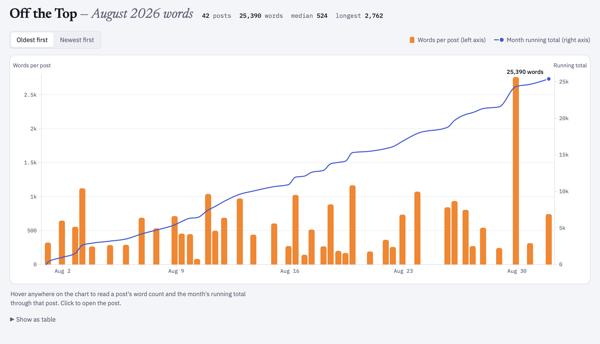
At the halfway point of Blaugust following my saying I was in on Blaugust and aiming for 31 post in August, it is time for a check-in. On the 16th of August I have 22 posts (counting this post), which is more than I expected. I had two personal goals for the Blaugust endeavor: 1) Get back in the habit of posting and comfortable with the workflow; 2) Make a dent on my long list of blogfodder.

Back Comfortable with My Workflow

Not only am I comfortable with my workflow, but I’ve made tweaks to it. I have a lot of Daily Dump notes with things written out in the sections that could easily turn into a blog post. Now I have a smoother flow taking those notes and quickly extracting them to their own note, immediately having it transcluded back in, add the blog note framings, as well as blogfodder tracking, which makes it very quick to extract, wrap it for a post, and run through the edit and posting steps.

I am not only more comfortable with my process, but I’m feeling like I’m back living in my site again. I am using my blog search as I prep a note to potentially post to see what I have that may be similar or nice to add to a post as a reference. I also have been finding quite a few small UI gaffs that needed fixing and knocking them out. All pages in the blog area should have “Blog Search” in the navigation. There were layout twitches in layout switching between blog main page and individual post pages, which has been there a long time. This twitch isn’t fully gone, but far less noticeable.

Another thing I did was add some categories to accommodate creative and fiction posts, which I have been trying to sort out what to do with them. I may have another option at some point, but for now I have a decent option.

Making a Dent In Blogfodder List?

Uh… On this front I have knocked out a few items on the blogfodder list, cleaned up the list a little, but the list got a bit longer. Many of the posts for Blaugust have been new ideas and not coming out of the blogfodder list. Many of the items on the list are longer pieces and need more work, but they are likely going to be posted on Personal InfoCloud, but I will note here that I’ve posted there (just like the old days).

Some of those longer pieces will cover: “folksonomy and LLMs” (this question comes up a lot and helping quite a few understand the realities and frame their needs); “My working with AI since 2008”; “My AI policy for my sites (in short nothing read was created or edited by AI)”; “AI and Social Computing (particularly around teams and organizations)”; and other topic. I have quite a few others I swore I have posted over the years, but nope, so I’ve queued those up as well.


10 August 2026

My Automations Over the Ages and Today’s View

For a few decades I’ve converted regular manual tasks into automated tasks for many things. I use short code keyboard conversions with TextExpander (TextExpander), Alfred (Alfred), Keyboard Maestro (Keyboard Maestro), Hazel (Hazel by Noodlesoft), Apple Shortcuts, and a couple other small apps and services. But, I also have quite a few scripts in python and Ruby, but a few pure bash scripts. I have a handful of apps that use Claude Cowork (Claude Cowork | Claude by Anthropic) on a schedule and used where the data is not always standard, so it aggregates and structures the data where it often later gets processed by python.

I started building and running automation scripts in the 1990s to handle tedious tasks with multiple steps, or would likely be victims for typos, and which I was handling daily. A task that would take 3 or more minutes (often longer) and had structured stable data I could search made it viable to become a script and automated. I had them to filter email to folders, filter downloads to common folders / directories, and one to turn off audio for the evening which monitored Twitter every 30 minutes for my nightly signoff (“off to read and sleep - zzzz”) and it would mute audio. I’ve had a few for audio that would capture podcasts I was on for a local copy during recording that took just one button click to set Audio Hijack Pro properly and it just worked.

Moving to the Current Adaptive Flows

The last six months (or a little more) I’ve been building aggregators to capture what I’ve done the day before (and the week prior for a manual review). I’ve also automated my morning Obsidian (Obsidian) setup, so that my daily note (or Daily Dump for my notes, in my vocabulary) templates are created for the week ahead with a python script, rather than creating a new note and use a TextExpander snippet to build the structure each morning. But, doing this I realized that I could take my daily task list and the list of potential tasks I keep at the top of my Daily Dump and script the moving uncompleted items to that day’s Daily Dump from the day prior, but also quickly run a calendar scan for the day with Claude and the BusyCal MCP to have my known items at the top of the note written directly in the note. The completed items and checked off were left on the prior day’s Daily Dump in their sections.

In order to run the scheduled python scripts I need my laptop to be awake in the background (but it still the screen remain locked) so to run early morning tasks. I found PMSET as the key to handle the wake-up for the first run and have a python script handle the remaining wake-up processes for that day.

I now have a mix of Claude Cowork Skills (which if I sort out the data is stable enough I convert them to python for consistency, speed, and sustainability) and python scripts that pull my prior day’s files created and worked on list, my items in a feed of the prior day’s additions to Instapaper, Pinboard, and a list of new items in DevonThink as PDF (with links to the PDF as well as a working URL to the source of the item), a list of Readwise articles and video transcripts, and videos I liked and sent to my personal instance of Slack. These lists are in markdown and placed into the directory Obsidian watches over. Most of them a little later in the morning are transcluded into my Daily Dump note for the day where I read through them.

Morning Process

My morning process is to read through what was done the day before and edit them to add links to other resources in Obsidian and write notes. Often I have some entries that will turn into that day’s list of things to do or one of the “potentials” list. I will take items that need to be their own item note or be included into a concept note. This keeps the items fresh on my brain and connecting things to where I can get back to them more easily.

I write this today, as this morning I found my morning automation hadn’t fully run properly, because my Sunday evening script to create the week’s Daily Dump notes didn’t run as it was a cronjob and I was cooking with the laptop asleep so the job didn’t kick off. This morning I converted the cronjob to a launchd task instead and to run on Sunday during another automated wake open window.

Weekly Aggregation

Sunday’s I also run a weekly wrap-up, that pulls everything done for the week. I’m finding this is a bit too much information for a quick review and a manual assessment for the week where I aim to map out things for the upcoming week. It is a bit too much information overload. I don’t know what I’m going to do about it. Now that I have things automated and aggregated I need to rework my human side of things.

The Value of the Automation

The goal of my automations is to give me time back and remove the manual and grunt work so I can do the thinking work. I’ve done this with personal life and work life (and large systems and projects). The current round of automation and aggregation surfaced that I am doing more than I thought I was doing. Another goal is to give more time to do the human thinking and the projects and work needed. I do this so I can do the creative human work and the human thinking work (I find large errors in summarization in nearly all generative AI and creative work so I keep that at bey and use it for grunt work that I check). The scripted automations don’t need the hand holding and I have some occasional test run to check on them to see if they need attention and honing.


6 August 2026

Podcast Interviews and Presentations the Last Few Years

The last few years I’ve been on a handful things that have been shared out, but I’ve not posted about them. I’ve started to add them to my homepage, about page, and an old media pages. Posting things here, sometimes slips my mind.

The first two are for a company I’ve long been a fan of The Omni Group as I’ve used OmniGraffle and OmniOutliner around the time I picked up my first Mac for myself in 2001. The two products may have been included with the purchase of Mac and were great apps that have been a have been a central part of "the tools I think in" and communicate using. They asked if I would be on to talk about my use.

OmniGroup Podcast

In 2023 I had an invite to talk about my over 20 years of use of OmniOutline and OmniGraffle for the Omni Group’s podcast. (I also have used OmniFocus heavily, but haven’t been using it for a while due to work limitations and I got out of the habit and I haven’t restarted the habit). The interview by Andrew J. Mason with me talking about, How Thomas Vander Wal Uses Omni Software. I really enjoyed this interview as I’ve deeply enjoyed and used OmniOutliner and OmniGraffle for a very long time. I have my full set of Complexity Lenses and sub-elements (Complexity Lenses – An Overview – Personal InfoCloud) (there are now over 100 lenses with over 1,500 nodes altogether). I use OmniGraffle a lot for explanations, diagrams of systems and processes, but also quick graphics to put into Keynote presentations.

OmniGroup Podcast 100th Episode and 30 Year Celebration

100th Episode Celebration with Ken Case - In this I have a short snippet to offer thanks and congratulations to the 100th Episode of the podcast, but also to Ken Case for 30 years of OmniGroup. I was deeply honored to be asked to contribute to this and to be included with so many other wonderful people whose work I’ve deeply appreciated as well for many years.

Seeing Clearly Through the Fog of Complexity - on the Complexity Lounge

In February 204 I did a two hour presentation and Q&A with the The Complexity Lounge to present my Seeing Clearly Through the Fog of Complexity talk. This is a good group and having this available to share is a wonderful asset to have. This is a decent intro to the Complexity Lenses and contains around 12 to 14 lenses touched on during this talk.

Sustainable AI That Has Our Backs interviewed by Jane McConnell

Also in February of 2024 I was interviewed by Jane McConnell for his Imaginize World podcast talking about sustainable AI - Sustainable AI That Has Our Backs — Thomas Vander Wal | Full Podcast Episode - YouTube. This touches on the balance of assistance it can offer, but also some of the troubling areas around it. I started working with AI/ML (along with NLP) in mid–2008, and that background comes into this discussion.

MacSparky Members Only - DevonThink Power Use Overview

I did a deep dive on my DEVONthink use, which I’ve used since 2003 and now has roughly 180,000 objects (in one database) with David Sparks for one of his groups in MacSparky Labs. I don’t have access to it, but it is out there as well. Since 2003 I have tucked away anything I think I may have potential future interest to me in into DevonThink. I’ve been amazed that DevonThink’s incredible search on what is in its database is still solid and quick. But, its most amazing feature to me is the “See Also” tab in its insights button, which when looking at a document it will show you other documents related and its strength of confidence on that relationship. This See Also is incredibly good and has not only found things I wasn’t looking for, but it has drawn connections to things that have been massive lightbulb going on moments and started new idea and paths of exploration.


4 August 2026

The Guideline of Two Things Not to Discuss Is Now Three

The rough guideline for what not to discuss in polite company are (well were) two things: Politics and Religion. This is to avoid arguments and rabbit hole to hell conversations.

It seems there now is a third on this list, AI. I’ve seen a good gathering utterly devolve after AI start coming up. Much of the conversation isn’t well informed (or even partially informed), but there is a lot to know and a lot of different sides / dimensions. Even being well informed on all sides one can still be deeply conflicting for an individual.

AI, as a whole has been around a long time. I started into AI/ML (along with NLP) in 2008 and found it helpful, but found it resource intensive and you had to know quite a bit to use it. In 2008 I figured I was behind. Today it is easier to use, but you still have to know a decent amount around what it is you are doing in what you are wanting to do and know know AI well, to get something decent out.

The current efforts aren’t all they are cracked up to be, vastly over-hyped, and the “creative” outputs are tilting toward meh at best and often best skipped. Many people think the intelligence portion is smart in domains they themself don’t understand well, but not so great in areas they do understand well.

Quite a few times I’ve started to have, what I hope to be a good discussion about all the dimensions of AI (it is vastly more than GenAI) and learned those discussion I need to keep to a few people whom know well, all the sides or many of them.


5 June 2026

The Poetry of Time

Today a package arrived that I’ve been deeply looking forward to. Part of the anticipation is the pure utter whimsy of it, part is it was a Kickstarter project that involved hardware (read hardware is hard when manufacturing is involved), and knowing the creator and watching all the steps along the way I was happy to see it and touch it. This is the Poem/1.

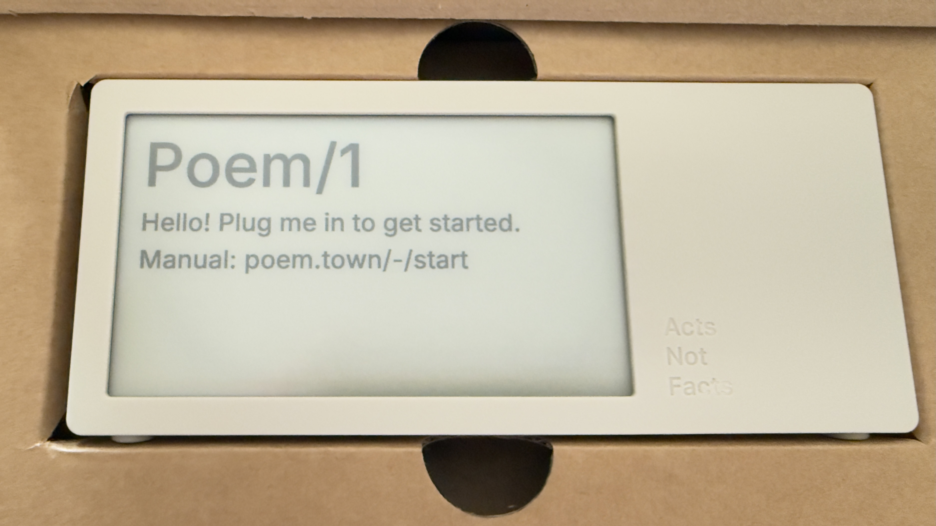
Poem clock in the box

Most of all, this device is giving me a lot of enjoyment and, well, glee.

The Poem/1 Arrived

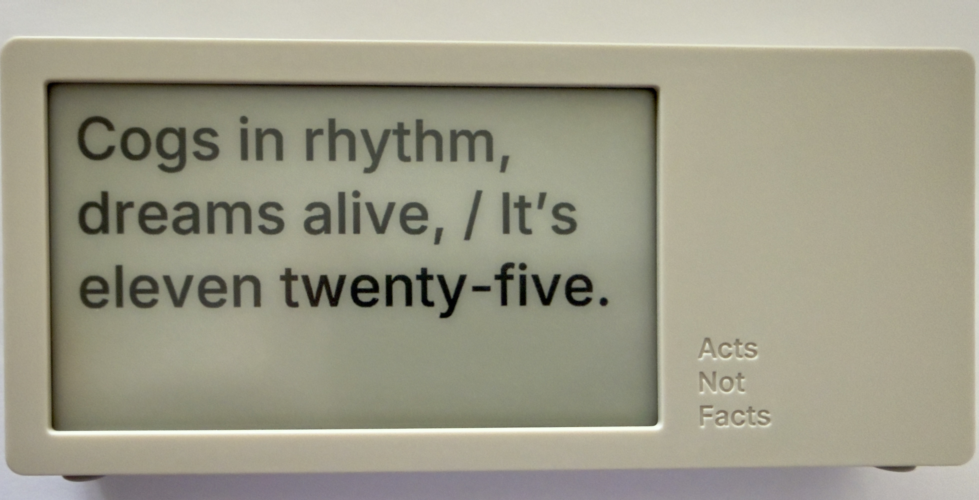
This poetry clock in the few hours I have had it running, with its e-ink display that updates every minute with a new poem for the time, which is / was generated by AI. Some of the poems are, well unique, and others are wonderful, but they can be favorited with the one button on the device.

The one button does a lot of work. It can be used to favorite a poem. There is a site with a dashboard for your device where you can push it notes you write to display, but to clear the note and get back to the clock you use the one button. There is a sleep mode with a screen saver and to clear that, you use the one button.

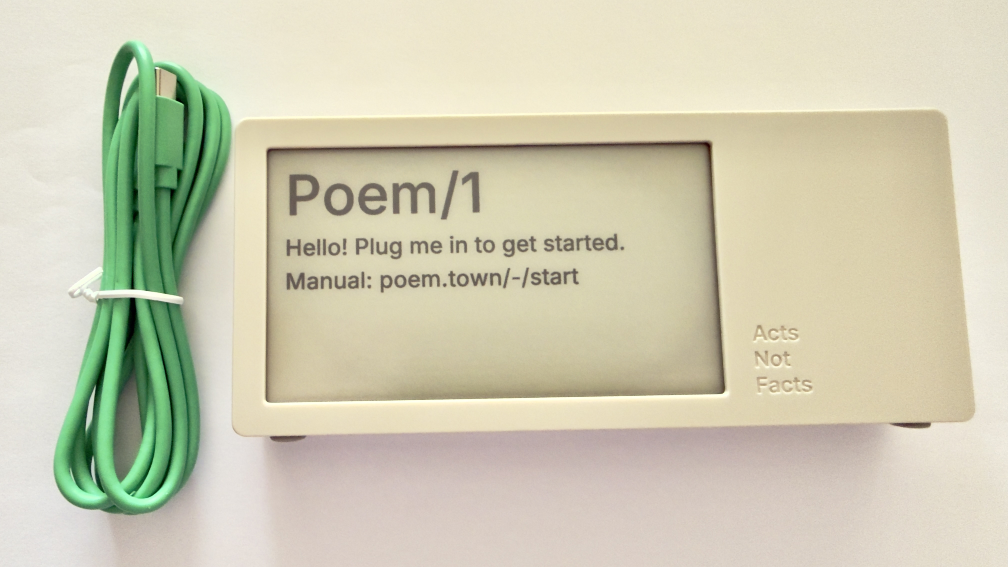
Poem clock and USB-C cable

The Poem/1 also has one USB-C cable. There is no manual in the box. Everything you need is the new Poem/1 device, the USB-C cable, and the e-ink screen tells you the rest.

After plugging it in you get a screen with some technical details and a QR code and using your phone with the QR code it then walks you through everything from easily connecting it to your WiFi (if printers could do this…), then make a selection or two and you have poetry time. There is also a dashboard website and the setup to your device is incredibly easy as is the setting up the account on that site.

photo of poem clock displaying Cogs in rhythm, dreams alife, It's Eleven twentry-five.'

The Journey of Poem/1

About 3 years ago Matt Webb blogged about an idea he had about an AI poetry clock, My new job is AI sommelier and I detect the bouquet of progress (Interconnected). This soon got connected to an e-ink device and Matt was on his way.

Matt setup a Kickstarter, which I happily backed. It wasn’t that I was overly keen with the AI bits (I’ve been working with AI/ML going back to 2008 and stayed current and it is a thing that I treated, like most everything else, as a tool). But I enjoyed the process of little printer – BERG and its outcome from afar. Having watched Little Printer’s journey of toil to come to life from Berg London (Matt and the amazing folks there), I wanted to support Matt (who mostly did this Poem/1 project alone). This provided insite into his long journey of quickly getting to a working prototype, then the slog of finding viable parts, a manufacturer, various regulatory approvals, and iterations when due to various things there were changes made late mid-stream to add to the delays.

Matt has done a good job logging his slog and journey. There were times where I’d realized I’d forgotten about Poem/1 and not heard of any progress in a while. About that time Matt would have an update in Kickstarter or on his blog.

Then there was US Customs, which stalled things for a while (not the tariffs, which became a hurdle earlier), but there there was more paperwork needed around “what is this clock”, oddly I (the customer) was sent the forms and I knew there wasn’t a winding mechanism nor jewels in it (well I haven’t checked inside, but pretty sure there are no jewels). Matt did a great job documenting the US Customs documentation hurdle in his post, How global logistics got me over my fear of personal agents (Interconnected) (my having worked at a Custom’s Brokerage for a few years I know the many reasons brokerages are needed).

What Time Is It?

I love the ability to favorite a time. (What is your favorite time?) In a few hours I have a couple favorites that I quite like:

Puddles reflect lost skies, / At two forty-five, heart sighs.

At twelve fifty, shadows creep, / Secrets held within silence deep.

Willow branches gently sway, / It’s twelve twenty-five today.

Thank you Matt I now have favorite times and a wonderful product.


10 May 2026

Joy Filled Email about Poem1 Shipping

This weekend started with an email about something shipping that I’ve anticipated for nearly 2.5 years. In January 2024 Matt Webb posted about a hardware clock what shows AI created poems for all the times of a day on an e-ink screen. This was something that caught my interest, less for the AI and more for the whimsey. But, the other part of it was hardware and the adventure that brings.

Not Matt’s First Hardware Experience

Matt had been part of Webb and Schulze, which turned into BERG London that was highly innovative playing with ideas at the edges. One of their creations was little printer. Part of watching that journey was some of the creation and manufacturing of the hardware that Berg shared out.

With this poem clock that Matt named “Poem1”, he turned it into a kickstarter project, and that brought along with it a look into the creation of a hardware product as it really is for things not at the scale of tens of thousands, if not orders of magnitude higher. Hardware is hard for electronics with getting all the parts approved, and then lined up to run through production it is a painstaking process and incredibly long.

So Excited by the Email

When I saw the email I was excited, like one is for people finishing an around the globe sailing adventure or some other long arduous feat. Getting the device will bring enjoyment, but watching from the blog about the inception of the idea, through turning it into a Kickstarter project and the emails about progress and the long waits between emails when approval waits were happening (or looking for plan B or Q for dealing with a part change needed).

I am so happy for Matt and having his device out into the world in people’s hands shortly.


21 June 2025

2025 Vanderwal.net Backend Modernization is Done

A couple years ago I thought I would update the backend code from PHP 5.6 to PHP 7 and initial progress on it was hindered by time available.

Planning the Modernization Work

A few weeks back I started looking at it again and mapped it out properly like a project. I realized PHP 7 was deprecated and I should really head to PHP 8, so that target was set. I was planning on keeping things relatively simple using a database connection quite similar to what I had used, but digging through PHP 8 books and resources on O’Reilly Learning Platform everything was using a newer more flexible method. After digging further I took the route that would take a bit more work modifying existing code (some going back to 2000 and 2001). But, as I dug into the work I realized I was only needing to modify and modernize about 20% to 30% of code on the pages and templates.

In doing this I also realized my old method of security around the system management backend was no longer working, so it had to be rewritten as well. That meant rebuilding the backend screens. Those updates went live two days ago on the 19th.

With that done it was back to the last third or so of the pages and templates that are public facing. I had already reworked the category output pages and adding pagination to them. No longer will all 121 Folksonomy categorized posts show up on one screen, only 15 at a time will. The “Personal” category has 369 posts (it is a blog so it is about me, you see, but just not all of it).

The RSS feed received a very minor update to RSS 0.92 to keep in line with many of the OG methods that remain.

The Actual Homepage has been Restructured

The homepage for vanderwal.net has been restructured to make it easier to find information that isn’t directly in the blog and I get emails and DMs about somewhat regularly. Moving it to two columns helped this. I do need to modify this to flex or grid CSS model as tweaking the layout was rather tedious.

This Modernization was like Changing the Plumbing and Wiring in a Building

This modernization was like bringing the plumbing and wiring of a building up to new building code. The walls and structure are all pretty much the same. The top layer stays the same for now.

This modernization does allow me to hopefully finish setting up webmentions, which I’ve had partly wired since around 2021 or so. I just need the last piece to that to work. There are also other IndieWeb related updates I’m planning on making and have been waiting to get this code updated before modifying and adding them into place. By the way, if you are running your own site and/or blog, the IndieWeb community has a gem. There are a lot of resources in their wiki and pages helping anybody with their own site.

The pagination for the blog is likely going to change from a date with month focussed pagination to a page model with the oldest selection being page 1. The archive page will get a long over due update so it doesn’t stop at 2003 (looks at calendar, yep it is out of date). I’m hoping to have an archive page that shows activity, but also addresses the different post types (essay, journal, and weblog) that only lasted the first few years, but also around the 2014 code update and site move the entry type template went missing.

The category listings pages will also likely get an update and the category page may likely get some ease of moving through the posts over time, beyond general pagination.

Assistance with the Update

This being 2025 the question pops up if and how I was using generative AI as part of this. I was using Claude.ai from Anthropic with some initial questions, then I’d head to O’Reilly’s resources to validate them and learn what I needed to know (it had been about 10 years since I was knee deep into PHP). When coding and modernizing the pages and templates I’d and hit defects I’d run those past Claude to sort out what the issue may be (sometimes missing “;”, others the new query wrapper and parsing method caused me to miss something, or I had deprecated code I hadn’t converted). Claude would point out my errors and instruct me how to correct it. Sometimes it would offer a few options for approaches (some were not quite right and others were good and I needed to select a path - after verifying and learning about them further). It also would crank out code. I gave Claude instructions not to bother with large chunks of my pages and code, which it left alone.

I use Claude stand alone and used is Project function to keep things focussed. I fed it the outlines and high level task areas I have in GitHub and Obsidian and it was keeping track of what was accomplished and how the work met the goals. The most impressive thing, compared to other generative AI options is it was very strict with identifying things not viable in PHP 8 (and its iterative versions) as nothing else did this well. Claude also had the code of pages and templates I had worked on and would point out I was using a structure and method in other page and ask if I shouldn’t use that practice on the page I just fed it to sort out some defect I was working through. My code has had four or more iterations over the 25 years and my early coding wasn’t so hot and still remained. Claude helped my code get more consistent, not by it fixing it, but pointing out I had something good and modern and I should keep consistent with that. By the last couple of templates I didn’t need to have Claude check them as they worked with my own editing, but I still fed them in as it seems to help improve suggestions and catching lack of consistency of my own doing.

A year ago I tried this with OpenAI and its ChatGPT and it was a hot mess. It couldn’t keep PHP versions correct. I try it with every update and I find it really problematic and what it outputs (code and other attempts) as nothing better than mediocre and often not correct.

IDE Use

In the last 10 to 15 years the IDE I’ve used to code and work on vanderwal.net has been from Panic and either Coda or now Nova, which have worked well. I have kept a good firewall between AI assistance and the IDE. I don’t mind type ahead suggestions. But, finding deprecated code to address was something I was going to need. Some friends suggested I try PhpStorm by JetBrains, which seemed good as I’ve used PyCharm a few times in the past and really enjoyed it. I knew I didn’t want VS Code near this, as I’ve pretty much had it with VS Code (I mostly use it with Python for data analytics) due to plug-in issues and lack of ease keeping projects separated.

I picked-up a trial of PHPStorm and after a day or so I had the hang of a good portion of what I needed to do. My favorite part is the setting the exact version of PHP you are working with. It highlights where there are errors and problems. In the last couple of days as I finally was getting the hang of PHP 8 and the methods I was regularly using PHPStorm was helping with type ahead suggestions (there were a few times where I accidentally triggered them when I didn’t want them and nearly turned of that functionality - control Z is your friend). PHPStorm also can make use of GitHub CoPilot, which I don’t find helpful with OpenAI connected to it, but is better with Claude Sonnet. The downside with CoPilot is it doesn’t have access to the Project space in Claude I’ve been working with and therefore its suggestions are less on target - CoPilot with Claude is light years better for PHP than OpenAI offerings). Essentially I didn’t use the incorporated genAI functionality and I was very happy with that setup.

Posting Ease

One of the things I’m looking forward to are slightly better methods for posting to this site and managing posts. Many of the steps beyond creating and posting are manual steps, like kicking off creation of the RSS feed (I do that after a quick review of the created post as it is live, I kick the RSS feed after that review). The alerting the media, or the alerts beyond basic RSS, is also a manual step done after that review. I may automate the combination of those two kicks after a review.


18 June 2003

Phone butler learns your ways

The Beeb offers insight into the Phone Butler. This phone app learns what calendaring events the user will set and which she does not. The learning how the user thinks is the wonderful part. This could be a nice step forward for artificial intelligence (AI) if it would grasp the fine discriminators.

In the past I have opened up my calendar requests to a coworker to accept and reject invites for me. This was needed as many days I have back-to-back meetings and face-to-face time on my way back from meetings. An application that could do this and respond when there are overlaps in appointments and know which has priority would be great. If it could synch my work and outside life across five machines and devices and four Operating systems and six applications I would be in floating on clouds.


This work is licensed under the Creative Commons Attribution-NonCommercial-ShareAlike License.