Off the Top: Writing Entries

20052010201520202025

Showing posts: 1-15 of 23 total posts


2 September 2026

Can I See What You Are Writing

The medium for thinking and consumption is something I continually consider. I don’t consume audiobooks, they don’t work for me and I have too many foundational problems with them. But, I do enjoy podcasts, but that is a naturally spoken medium. For consumption of fiction and most non-fiction I have a strong preference for print (physical and/or electronic). Non-fiction text gives the opportunity for illustrations that help augment and anchor the meaning. Video can work for many concepts if they are done well and illustrate concepts.

Reading fiction my mind slips into vivid depictions of the story and scenes (if the book captures me). Being able to see characters in my head helps keep the storyline sorted. I really appreciate authors that are crafty with languages that trigger the visualizations as I am reading. With reading fiction my mind may also drift (if the book is good, but this also happens with non-fiction as I am framing where this new information sifts in with other things known). When my mind drifts I may still be “reading” and flipping pages, but when I snap out of it I can flip back to where my mind drifted and continue on again (as a couple of my college professor encourage this is a really good and engaging way to read). Most often the drifting is related to something in the book triggering ideas and it gets my mind going. Audio books have my mind drift out from a of lack of interest, but more problematic is there really isn’t a good way to go back and pick-up where my mind drifted (oddly podcasts my mind will drift from them triggering ideas and also from a conversation the podcast triggers, particularly when they run adjacent to things I know well or they mis-state something).

The visualization in my mind is really helpful to keep engaged and it is great for recall as well. But, when a book turns into a film or tv show it sometimes helps (when there are many characters) to anchor the “whos”. The reading of plays I find difficult, unless I have seen the play or have photos or sketches of who is playing the role and then I fully connect. But, if it a book with illustrated characters, like the Moomins (I read a lot of Moomin books when I was a kid) and that turns into tv or a movie it breaks things my mental image of the illustrations through the stories are not in alignment. The Moomins were quite off (at least in the US series). But, Paddington worked just fine. With the Moomins becoming semi-popular in the US with young adults, I’ll ask about a person’s favorite Moomin or story and I find we are talking about Moomins from different universes it seems.

Seeing is Understanding

The mental images and visualizing ideas and concepts also drive explainers in presentations and the use of animation in presentations. That same principle for my engaging also goes outward when explaining things for others. Creating images and animations, for complicated or complex ideas, models, or patterns allows for pulling them apart, seeing things interact, and also provides the ability to point and talk about something specific and makes things less abstract.

I’m thinking about text and visualizations as I’m working on creating small videos of some of the core concepts and ideas around folksonomy, Model of Attraction, InfoClouds, etc. Listening to words is a thin and ephemeral representation of the ideas. Seeing the words is a bit better. But words and seeing relationships are key to communicating far better. I’m mindful not all minds are alike nor process the same way, so having many paths for engaging works quite well.


31 August 2026

A Wrap to Blaugust

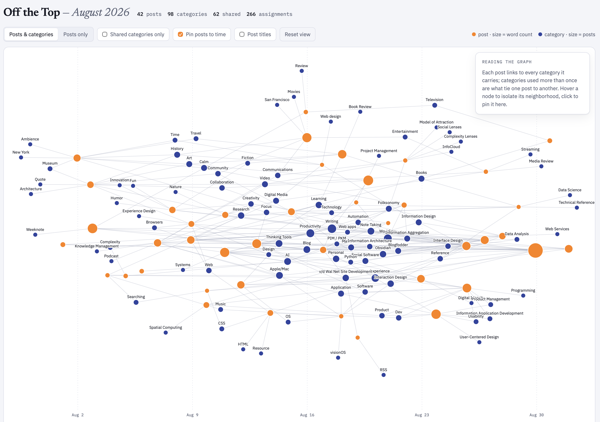
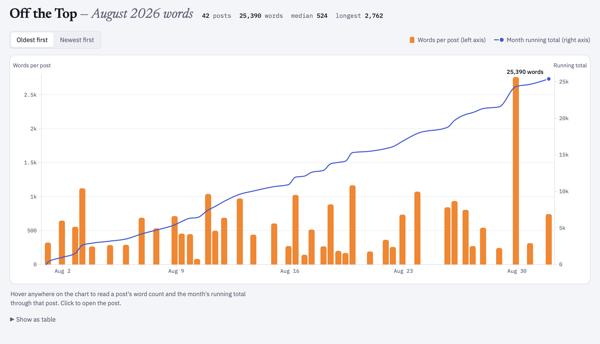
I’m looking back at August 2026 and Blaugust that started with the post Going in on Blaugust on August 1st, which I didn’t intend to be the first post, but it was in August (sort of, but more in a moment on that). With this overview of Blaugust I’ve had 42 posts in 31 days.

Many years ago I had a much higher number of posts per month, but that slowed and posts got longer. When I went in on Blaugust it was aiming at 31 posts in August. I figured that was an achievable goal. I didn’t intend on blogging every day and within the first couple of weeks I already had a buffer and was ahead of the one post per day rate. There were a few days (maybe 2 or 3) where I didn’t get a post in on the stated date on the blog, but all but one I had a post not long after that date is marked on my blog post.

One oddity I noticed is that my posting date and time are based on UTC not my local time and date. At some point with my current host I had my date and time in sync with my location. It really doesn’t matter that the date and time aren’t in sync. This is how the initial post wasn’t posted when I was in August yet, but was marked as such. I will take the 42 posts in the month as that seems to be a good answer. For years when my site was hosted in Australia the date and time posted was often quite off my location (except for a trip to Australia) and the posting time was fine for those reading in Austrailia.

What Was Learned from Blaugust?

As stated in another post or two this month, getting the workflow smoothed out and just getting the habit anchored was a good outcome. I had hoped to get a few of the longer and more complicated pieces posted that are in my blogfodder list, which would likely post on Personal InfoCloud. Some of those longer posts are much closer to now being finished. One I was working on today I thought would be ready to post today, but that wasn’t going to make it.

I need to sort out the workflow for the Personal InfoCloud as it is on WordPress and the block interface, which adds friction that doesn’t need to be there. But, with a few post for Personal InfoCloud nearly ready I should have a few workflow tests to hone that process as well.

I have a large list of blogfodder with posts that are mostly done needing tweaks and edits and I had hoped to get those through the process and posted, finally. But, the majority of the posts came from something at the front of mind and considered, written, edited, and posted in one flow. About a quarter of the posts were in the blogfodder list, or adjacent to something on the list.

Will the Pace of Posting Continue?

I’m not sure if a daily post pace or higher, will continue, but it may. I have some longer more complicated posts that will slow the pace. But, getting smaller posts out as things come to mind has a flow that works and that will likely keep some of the pace that has been essential to Blaugust.

With the posts to Personal InfoCloud, I’m likely going to write a shorter post pointing to it from here, or may post in both places and point to Personal InfoCloud version from here.

Things I Noticed

With Blaugust posting I had forgotten that my main blog page shows posts for the month, but also has a set minimum number of posts for the blog homepage. With a full month at a time makes for a long scroll when there are many posts. I was really wanting to work through some of the steps to move the structure of the blog to collections, Pagination Chronology Fix :: Lab :: vanderwal.net, but the time wasn’t there to tackle it.

Living in my site had me notice quite a few UI bugs that I fixed. I also found some page structure issues across the site and tackled those as well.

And…

Here’s to September with no theme, but focusing the usual focus things.


29 August 2026

Markdown Apps Loosely Joined

I recently posted about the different web browsers I regularly use, My Browser Family, and it makes sense to go through my different apps I use for Markdown in a similar way. My use is very closely tied to my Small Apps Loosely Joined mindset (part of the Shift Happed series on Personal InfoCloud). “Small apps loosely joined” focusses on having a core adaptable data structure (like markdown) and use different apps with written content where the app has helpful capabilities that are needed in a workflow or to focus on a type of work as a step in a workflow. Much like a woodworker picks up different tools to perform different tasks and doesn’t use a saw or chisel for all tasks, the small apps loosely joined model is similar. This works and has worked insanely well for 15+ years that I’ve leaned heavily on markdown.

I end up in markdown discussions rather easily it seems. The way I have taken notes in text apps with asterisks or dashes for bullets and the octothorp (you know, this thing #) for headings goes a long way back for me (starting somewhere in the 1990s). When I came across markdown in the early 2000s, after I had looked at and tried Textile Markup, but markdown didn’t fully connect. It echoed what I had done and offered more, but at the time I didn’t see the advantage of the added capabilities.

In 2010 and 2011 I started to shift much of my note taking and writing away from apps that were siloed and lock-in models. The flow from notes from a meeting, to my personal notes and annotations, and on to writing that gets shared out was a series of less than optimal apps that all had lock-in and heavy friction. Microsoft products not only had intentional lock-in but were continually buggy. I loved (and still do) Scrivener for writing longer pieces in it due to its managing notes and scraps related to the longer writing piece, but getting things in, as well as getting things out into my various sharing / publishing workflows had a lot of friction. At this time my parents were sick and passed on. When my mom passed my laptop hard drive took it as a hint and it too left the living world. I had everything backed up and I was working off the back up drive hanging off my Mac, and was waiting on a hard drive replacement, but needed something for notes for meetings (with banks, lawyers, and so much more) that I could move across everything. I nabbed an iPad for that mobility to take to meetings have files move across and back to my Mac. This tipped me into a full markdown life.

Like Many, Not All Markdown Goes to the Web

Markdown started by John Gruber to be an easy means of writing with light structure, while maintaining decent readability and to fit his model notes, which Textile didn’t fully fit. John created markdown and the markdown conversion to HTML as a matched set. Over the years many write markdown that gets converted to HTML, but around 2010 I’d see people were using markdown that never was converted to HTML. Markdown was what they wrote in as it was highly portable and editable from any text tool or markdown app and not in buggy and lock-in software. I noticed this in San Francisco on a trip where I stopped in a couple law offices to visit friends and the receptionist and legal assistants were mostly using markdown. This surprised me, as it wasn’t something I expected. Largely markdown for writing has been in tech adjacent roles and organizations. Later year seeing high school kids and college kids using markdown for their notes and paper drafts, then pasting to Google Docs was really impressive with the deftness they worked and how they managed everything. (A funny sidenote is many who went through school this way were appalled that Microsoft Word didn’t natively understand markdown). Markdown isn’t the parent’s use case any longer.

Today markdown for me only has around 20% that gets turned into HTML. Most are notes and documents that stay in markdown or turned into Google Docs, PDFs, text in Keynote presentations, and much more. Markdown is incredibly flexible with just enough structure to get converted as needed.

At First Many Apps Only Sort of Joined

This 2011 timeframe was the heyday of small light markdown apps. I picked up many apps and found a few that worked well. I was knee-deep in the markdown matrix table that Brett Terpstra maintained that showed the markdown app and the capabilities and compared what seemed like well over 60 apps. I used Simplenote, Byword, 1Writer, Ulysses, and Bear notes quite a bit and have kept them around but don’t use them as much due to friction for where and how they keep markdown files and some interfaces didn’t evolve. I also have used Working Copy, Git on iOS on Mac and iOS (iPad) for working on larger documents across devices and with others.

Moving to Less Friction for Markdown Loosely Joined

Apps that stayed around and were added in respected where I kept my notes and work. Most of the notes and writing stayed in a notes directory, but also were in project work. My notes directory on my Mac was linked out to iCloud so I could have access from my iPad or other devices. For a long stretch my basic notes app on my Mac was NVAlt, which allowed for tagging the markdown files, which meant that while they lived in my notes directory, I could aggregate all project work in the project folders, other media, and notes all with a file tag on Mac. This was fine until NVAlt stopped opening.

My Menagerie of Markdown Apps Now

My markdown notes that NVAlt sat over (which also included a folder from Notional use) had a few thousand notes when it stopped opening. But, the markdown notes weren’t owned and controlled by NVAlt and I could use nearly any markdown app I had to open and edit them. I wanted something very close to NVAlt.

Obsidian

In June 2020, after trying to find a replacement for how I worked with NVAlt I tried a few apps, but the one standout was Obsidian which slid perfectly into the exact role that NVAlt had for me. This role was to sit over the directory of notes and oversee them, but functionality on top of the markdown notes. Obsidian added even more capabilities (which most of my other markdown apps also adopted portions of over time). Obsidian is where my daily notes, drafts of longer pieces, meeting notes, and so much more go. Everything is relatively findable and refindable through backlinks (wikilinks) that are bridges between notes (but also with a plug-in Strange New Worlds - Obsidian Plugin I can see what other notes link to the note I’m linking to, and part of the magic is the note I’m pointing to doesn’t need to exist to see those links), tags to aggregate related notes with that tag, and search.

The other great advantage of Obsidian is transclusion, where one note can be added in as a view into another note. I can start a note in a meeting note or a daily note, then highlight a section and extract that section as its own note, but then transclude that note back in to show it where it was. This extraction and transclusion allows for that one piece of notes to mature and / or be included as a transclusion into other notes. The transclusions can also bring in a sub-heading into another note to show the section in the sub-heading. (I have a longer take on how and why I don’t use zettelkasten, which is similar to what I learned going into college for how to have far better study habits and write papers far more easily, but it also broke contextual understanding and really broke multiple contextual relationships).

iA Writer

My longer form markdown writing app is iA Writer. Often an idea for writing will start as something small in Obsidian (often in a larger note) and gets fleshed out a little there. But, when it starts getting longer I will extract it as its own note and then pick it up in iA Writer to take it farther. I love iA Writer as the interface is quite plain and it is just me and words and minimal structure. I often will create sub-headings early in longer pieces as outline structure to be filled in. Then it is just writing. The iA Writer app also has some light grammar checking (which fits my needs well), a quick preview to see your work as output that has some design and layout in the UI. It can be turned into a very minimal interface as well with focus on the line your cursor is on and just a few lines around that active line.

By and large, iA Writer replaced Scrivener and Ulysses as my longer writing app. The segmentation and notes capability in these other apps have made their way in as sort of similar forms into iA Writer (not everything, but enough for me). What largely caused iA Writer to replace the other two was very little friction getting my writing out into other outputs. Dragging the proxy icon to Marked (now Marked 3) is all that I need to get to HTML, styled PDF, or Word.

Marked (now Marked 3)

The Marked app, which is now in its 3rd major version, is the markdown conversion and clean-up app of choice. Marked has a lot of different capabilities, including proofing, writing statistics (like readability score and much more), writing support with proof reading, linting, and support for a wide set of markdown capabilities. Everything for using Marked for converting markdown to other formats is quite customizable and rather straight forward if you have some skills.

MarkEdit

The MarkEdit. app is one app I use as my default markdown file opener. It is like Mac’s TextEdit app, but focuses on markdown. It shows all of the markdown marks in plain sight. I find the showing everything raw is a good thing for review and understanding structure quickly.

I receive markdown files from others quite a bit, I also have access to other’s Obsidian vaults, and I have many markdown files that are spread all around my Mac and cloud environments. When opening one of these from search or a link I want to keep it outside of my Obsidian so they don’t get included and intermingled. This is really helpful reading and editing other’s shared Obsidian vaults as I can open, read, edit, and then close it while keeping clear of my Obsidian. If I want to copy something from my notes in Obsidian to another’s Obsidian, the two apps for two different environments look different, which helps reduce errors.

BBEdit

Another plain interface for markdown I use is BBEdit by Bare Bones Software, which supports markdown, but is the jack-of-all-trades text and basic coding tool. BBEdit is a go to for a lot of different text and coding needs where clearing out the cruft of an IDE or app is needed. I often open markdown documents in BBEdit when there are a lot of consistent text modifications I need to make. I have pulled in large outlines I have made in markdown and I need to do much work with nested levels in the outline.

Drafts App

I use Drafts for text and idea capture when I am away from my Mac. Everything from quick atomic notes (like where I parked, name of a book mentioned when at coffee, etc.). Drafts has long had solid voice-to-text for all Apple devices (iPhone, Watch, iPad, Mac) so it a great capture application. Drafts also has a highly adaptable capability for what to do with the note once captured, like sending it to my notes directory that Obsidian sits over. It is fully markdown capable. I can take a voice-to-text note on my Watch when driving, or invoke Siri and have it open Drafts to a blank not and tap the mic and leave a voice-to-text note that automatically is save and I can open it when I park and add some markdown elements and use and action to send it off to Obsidian, text message, or so many different end points.

iPad Apps

I started using markdown heavily, largely because my Mac hard drive crashed and I was taking notes on an iPad. I’ve gone through a lot of different iPad apps for markdown.

I have Obsidian, iA Writer, and Drafts, which I use pretty much the same way as how I use them on the Mac. Obsidian on iPad is a bit more limited, but still good for capture and modifications of notes in the directories I have it sitting over. I have Drafts always available as a slideover option off to the right of the screen.

I have Editorial for iOS as a relatively plain markdown editor. I don’t use it as much as I used to, but good to know it is there and it is quite capable.

The iPad also has small focussed apps for certain tasks. I use TextCase for changing capitalization in notes. I use Terminology by Agile Tortoise, which is the same developer as Drafts, as a really good reference tool when writing on iPad.

Trying a Couple Apps

There are a couple of apps that I’ve been trying on Mac, which may have a place. The first is Lettera, which is a markdown editor for Mac by the makers of Bear, which is currently in a limited beta. When I was using Bear notes app I loved the interface as it was clean, but what I didn’t like about Bear was the lock-in of notes in the app, as there was too much friction to use a note outside of Bear. Lettera is the markdown editor that is free of Bear. It still seems to default to a Lettera folder in iCloud, but opens markdown notes from anywhere. This may be a better reading and annotation app (it has easy to use callouts) for some of the uses I’ve used MarkEdit.

The other app is one I’m trying again as I used it 8 years ago (or so) when it was in beta and free, but became fragile, buggy, and would crash. It looked good and was rather simple. They changed from the free app to a paid app with the same name. I ended up with two versions with the same app with the icon and it was difficult to discern which was the flakey app and which was the good. Once the good version became pay, so I had neither working. This was Typora. In recent months many new to markdown have been talking about Typora and I get asked about it. Today I finally downloaded it again after deleting both of my instances of it a few years ago.

The current Typora has a lot of capabilities now, far beyond what it used to have. It has a similar interface, until you open settings then it has a lot of customizations. Typora can now cover a lot of ground. Much of it is covered in other apps I have, but I may find my current model of having different apps for different uses that are incredibly good for the purpose I use them is my preferred way of working. Having different apps helps me focus on what I am doing in that app to the markdown file and the task and focus needed from me for that task. To get to the same thing in Typora I would have to go to settings and make changes to keep that focus, but the context of the different app isn’t there. Moving between apps I will also keep the markdown file in multiple apps and see an edit in one instantly show in all the other apps (what good magic is this). Typora nice interface with additions for math UI (through LaTex) and charts (through Mermaid) may be a draw to keep it around.
26 August 2026

Honey, The Thing Ate My Blog

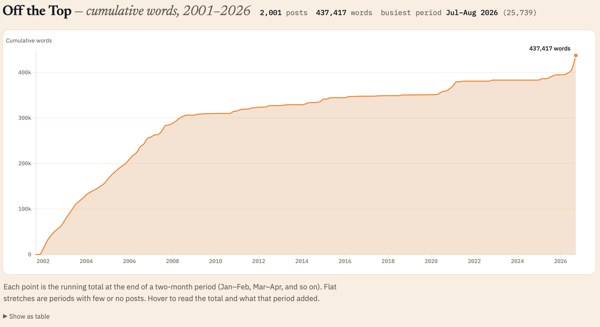
In the past few months I’ve looked at the history of my blog analytically and captured some of it in, Personal Blog Data Analysis - Looking at 25 Years :: Off the Top, and I could see the changes in posts over time. I used to joke that “Twitter ate my blog”, as what I was posting on my site, was going into Twitter and not my site. Looking at the analysis that transition is clear. I have my archive of tweets from my three accounts (my main one turned private and two public accounts with one more work-related and the other responses to others and tracking sports).

Twitter vs. Blog

During that time posting to Twitter, my posts grew less frequent, but also longer. Twitter helped me write shorter sentences as it started with just 140 characters available. During this time I was still also keeping regular notes in text in my Notes directory. I most often used NVAlt that allowed for tagging the note file and it had really good search for the Notes directory that predated my using NVAlt by 10+ years (I started keeping notes there in 2003 in text, OmniOutliner, and HTML, but shifted to mostly text until about 2010 when it was a mix of text and markdown).

As my use of Twitter dwindled and conversations I had been having there moved to back channels and topic-focused groups, my blog post didn’t come back. The ideas and content had outlets, but that wasn’t my blog.

Notes Stayed Local

In June 2020 I had been trying to find a new notes app that worked similarly to NVAlt, which had stopped opening in the prior year. I had a few text and markdown apps I used to add notes to my normal location (one was Notional, which I used for about a year). I tried Notion for a short bit, but not having local notes and it being cloud only made it a serious no go for me. I tried Logseq, a couple apps heavily focused on zettelkasten, and I tried Obsidian. Obsidian stuck for a lot of reasons, but the most important was I just set it to watch over my existing Notes directory and just keep going. The ability to use backlinks / wikilinks, tags, and transclude notes was a great fit.

I went back to a daily note pattern using my Daily Dump set of sections as prompts for quick access to an area in the note to capture ideas and notes around things found, worked on, and ideas I cared about. The ability to have concept pages and hubs that linked back to everything related, make notes in my Daily Dump and then highlight a section and extract it out as its own separate note and bring a transclusion (see it in another context) back into the Daily Dump and other relevant concept pages, was magical.

It became the note platform I’ve long wanted. I was capturing and making notes in it a lot. Notes could easily turn into blog posts. But, they weren’t turning into blog posts they just stayed notes. “Obsidian ate my blog” became my tongue-in-cheek joke. But, it was pretty much what happened.

I was writing in my notes, much like I used to blog. From short snippets to longer worked-through ideas and concepts. It was pretty much (and still is) all in my notes that Obsidian sits over.

The Daily Notes Out to Blog

I run analytics on my Obsidian notes and I’m creating and touching 10 to 20 different notes a day. Some of these, thanks to Blaugust, have been turning into blog posts, which was my intent with Blaugust. But, I also have been fleshing things out that started as blog post ideas and I flesh them out in my “Thoughts” section of my Daily Dump note (just like this one is). This new idea blog posting isn’t helping work through my large (over 100 notes) that are flagged as “blogfodder”. Many of the blogfodder ideas are half-done and sitting for months or years. Others have been nearly fully drafted and need an edit. Some have been stuck because the post (in my belief) needs another post or two to set the foundation for the post that to be shared out (I realize this as I go to point to a post that doesn’t exist, as it is only regular content in Keynote for workshops, presentations, and work engagement foundation setting).

I’m starting to work through the some of the blogfodder. But, I’m working on my daily notes becoming blog posts more regularly. Blaugust has been helping move from notes to post. When Blaugust wraps I need to see where all of this lands.


20 August 2026

An AI Site Content Statement

Others have added AI statements on their sites to state or explain the use or non-use of AI. With AI bots popping up in group chats and Zoom, it may be time to make a declaration here.

All writing and images that you read and see here are all made and edited by the human Thomas Vander Wal.

With that said, I have worked with and used artificial intelligence (AI) / machine learning (ML), along with natural language programming (NLP) since 2008. I started learning it and using it to learn and understand. Professionally, I’ve been on many projects starting in 2010 with AI/ML (NLP) for surfacing patterns in large data sets or feeding it large sets of documents to identify patterns, what may have been missed in review, or as one triage method.

So, I don’t use AI for writing, as I write to understand what I know and I share things out to find others with similar interests. I enjoy making and creating to get things out into the world. The creative part is something I really enjoy and I have no interest in handing that over.


19 August 2026

A Painting Exchange with Words about Hobbema's Wooded Landscape

This is a painting swap and collaboration that James proposed the other day where he gives me a painting to write about and I give him one. He had done this last year and wanted to do it again. Last year’s, Painting impressions with Zachary - with words, wonder.

I Gave James the Tower of Babylon

I gave James Pieter Bruegel‘s The Tower of Babel - Wikipedia. I have tried to see the actual work twice and was foiled both times. I’ve studied it formally and have a deep fascination for the breadth and detail in the work. You can read James’ words on the piece in his site: James’ words on the Tower of Babel Painting.

Meindert Hobbema’s Wooded Landscape

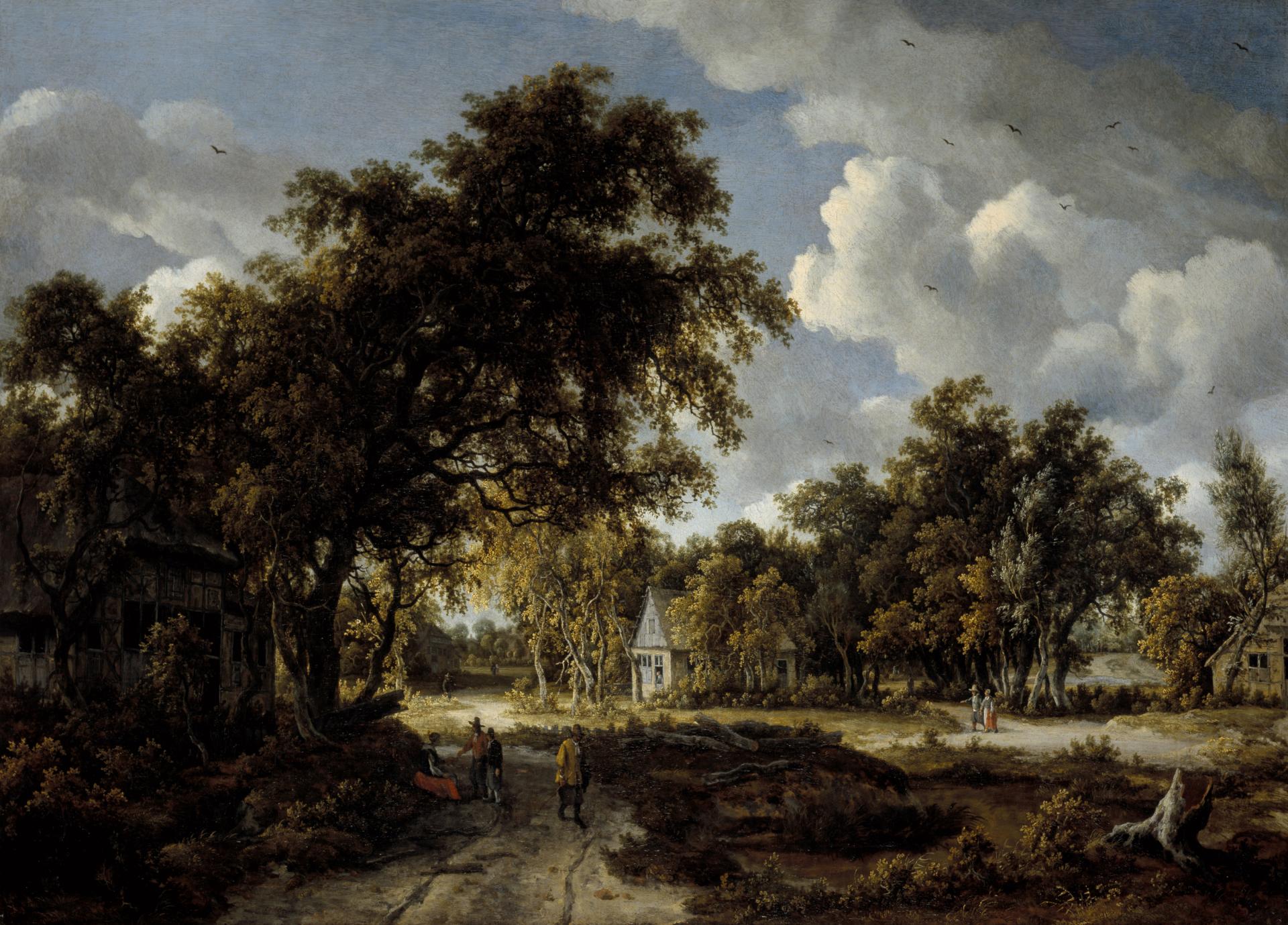
To me, James offered up a painting hanging in the National Galleries Scotland by Meindert Hobbema, Wooded Landscape.

This is a painting of open paths through woods with buildings surrounded by trees and people walking on the paths, through the trees there are large billowing clouds in the sky

When first looked at Meindert Hobbema’s Wooded Landscape my eye quickly saw the people, the path, the woods, and boldly clouded sky. The people in action, as if captured in a photo, are very reminiscent of Pieter Bruegel the Elder paintings of towns people in a mix of action, but this with with far few people and action. It has that life captured and people living their lives in the painting of Early Northern Renaissance painters like the works of those who came out of a Bruegel (elder or younger) or Bosch studio.

Looking at the people they seem to be wearing the dress of the English pilgrims who came to the US in the early to mid–1600s. Many of these pilgrims spent time in or near Leiden, Netherlands before heading off to the Americas. The men in their tall hats with sizable brims and wide band fits that pilgrim dress quite closely. The women’s modest dress and the men’s cut of their coats is very much akin to the paintings of pilgrims that Americans know.

But, the woodsy nature setting is a little different from Dutch paintings and are something I more often associate with English or German paintings. The sky framed by the trees seems like it is snippets of the long sky so common in the Netherlands, but also like it was dropped into England as well.

Staring at the painting for a while I kept trying to get it to tell me where it was.

The skies fit the long sky paintings of Dutch pastoral scenes or the vast paintings of Dutch fleet under sail or in combat on the North Sea. The large clouds billowing is common in both Dutch and British paintings, and very much a John Constable focus years later where the clouded skies are prominent and a focus.

But, in this painting the clouds are there, but occluded by the woods. The woods are a bit dark and provide shadows and cover for the people and buildings. But, as we back out a bit and pay attention to where the light shines it is on the blue grey building with a woman looking out, as if she is in anticipation of someone arriving or returning. With the one of the paths moving somewhat through the middle of the painting and out and away, that is mostly darkened, so not the focus. But, the light is favorable to the path to the right mid-ground with a man and woman walking toward the meeting of the paths near the front of the house with the woman looking out. Is the couple walking the awaited arrival? Or are they just walking through like the others.

In the foreground in the shadow of the trees on the left there are a couple of people talking to a woman and possibly touching hands or one handing something to the other, as the woman sits in front of a rather dark house. Across from her is a tree that has been toppled some time ago and weathered. There are rough piles of large tree trunks somewhat piles, was there a storm in the not too distant past? Are the clouds a new storm coming (but isn’t there always a storm brewing)?

One interesting element missing is a patron and person clearly in focus in the painting. It isn’t the people, nor their built environment that is the focus, which 100 to 200 years prior van Eyck, Memling, and others would have leaned into in their painting. Hobbema’s painting is more organic and not as structured as artist from earlier years. But, Hobbema is a contemporary of Vermeer and there is some rhyming of pale Northern light in this piece somewhat akin to what is found in a Vermeer. In the look across time the rough details in the distance of the couple walking past the house a ways ahead, but the leaves and foregrounds have soft details and rough shapes and not the pristine details of prior generations of Netherlandish painters.

The Gallery Painting Annotation

I tried to steer clear of the gallery’s annotation for the painting at the start, but reading it and mention that this is likely a imaginary place, makes a bit of sense as the mix of Dutch / Netherlandish styles, but the woods were something I couldn’t place (but I’m mostly thinking of flying over the Netherlands today with the vast swathes of farms, flat, and mostly a lack of woods). There are many tells that this is a Dutch painter, but there are pieces that seem to come from elsewhere, or a time in a place I am not quite familiar.

The gallery note of a made up place would make sense of the billowing clouds of darkening long sky, but paired with wonderful sun dappled woods and a potential village are added to a more pastoral and flat scene-scape. With Hobbema known for their wooded landscapes, I think of Thomas Kinkade’s cozy town cottages and paintings of the 1980s to early 2000s and the request and offers of payment to add more warmly lit candles and touches of light. But, with Hobbema was the request, “add more woods”?

Where Do I Land?

The painting has entertained me with the exercise of trying to sort out where this would be, what is the story being told (or what myriad of stories can come out of the painting), or is the painting just a painting to be a painting. Was this painted for a Dutch audience or a British one, as both around this time leaned toward large scenery and sky paintings. Constable is a half century or more yet to arrive.

This is now a painting I would like to see. I could also craft stories from this painted scene, with each visit to view and craft some new tale, much like sitting in a cafe with a street view and many tables of customers and telling the stories of the table guests and passers by.


16 August 2026

Halfway Through Blaugust

At the halfway point of Blaugust following my saying I was in on Blaugust and aiming for 31 post in August, it is time for a check-in. On the 16th of August I have 22 posts (counting this post), which is more than I expected. I had two personal goals for the Blaugust endeavor: 1) Get back in the habit of posting and comfortable with the workflow; 2) Make a dent on my long list of blogfodder.

Back Comfortable with My Workflow

Not only am I comfortable with my workflow, but I’ve made tweaks to it. I have a lot of Daily Dump notes with things written out in the sections that could easily turn into a blog post. Now I have a smoother flow taking those notes and quickly extracting them to their own note, immediately having it transcluded back in, add the blog note framings, as well as blogfodder tracking, which makes it very quick to extract, wrap it for a post, and run through the edit and posting steps.

I am not only more comfortable with my process, but I’m feeling like I’m back living in my site again. I am using my blog search as I prep a note to potentially post to see what I have that may be similar or nice to add to a post as a reference. I also have been finding quite a few small UI gaffs that needed fixing and knocking them out. All pages in the blog area should have “Blog Search” in the navigation. There were layout twitches in layout switching between blog main page and individual post pages, which has been there a long time. This twitch isn’t fully gone, but far less noticeable.

Another thing I did was add some categories to accommodate creative and fiction posts, which I have been trying to sort out what to do with them. I may have another option at some point, but for now I have a decent option.

Making a Dent In Blogfodder List?

Uh… On this front I have knocked out a few items on the blogfodder list, cleaned up the list a little, but the list got a bit longer. Many of the posts for Blaugust have been new ideas and not coming out of the blogfodder list. Many of the items on the list are longer pieces and need more work, but they are likely going to be posted on Personal InfoCloud, but I will note here that I’ve posted there (just like the old days).

Some of those longer pieces will cover: “folksonomy and LLMs” (this question comes up a lot and helping quite a few understand the realities and frame their needs); “My working with AI since 2008”; “My AI policy for my sites (in short nothing read was created or edited by AI)”; “AI and Social Computing (particularly around teams and organizations)”; and other topic. I have quite a few others I swore I have posted over the years, but nope, so I’ve queued those up as well.


12 August 2026

Thinking in Tools has a Category, Sort of

Posting more of what I’ve been only writing as notes for myself, but also things that start as intended posts, I’ve been updating and adding some categories. One category I thought I have had for a long time is Thinking Tools, which is for tools I think in. I have a regular set of tools I write, think, and research in and many have remained the same over many years.

Prior Thinking Tools Posts

Recently I posted about My Browser Family and I definitely think and work in Safari and Zen in different ways, which I outlined. Also in the Podcast Interviews and Presentations the Last Few Years I mention a little bit about my use of OmniGraffle by The Omni Group and OmniOutliner by The Omni Group. I have brought up Obsidian a fair amount since moving to use it as my regular note making app in June 2020, I got to the point of adding a category for it, Obsidian. But, my writing workflow has at least two markdown apps (including Obsidian) as I edit and work on longer writing pieces in iA Writer as it handles all the markdown I regularly use when writing and it is an interface that gets out of the way and lets me focus on words.

Some Tools I Write to Think In

My thinking tools also focus on adaptability so I can bounce between different markdown apps (adding in MarkEdit, Drafts, Marked, and BBEdit), but also can take outlines in OmniOutliner where I’m framing out ideas and export to OPML and import that OPML into a MindMapping app (my favorite is mostly gone (iThoughts), but mostly use MindNode that sort of fits the bill of need, but not as well). With MindMapping I can see the dimensions and gaps more easily and can relatively easily and rearrange the nodes. Sometimes I go back to OmniOutlines with that output, but either way it eventually makes it into markdown as an outline or headings and subheadings (and or export to Keynote as very rough slides).

See It to Think It More Clearly

When I need to see systems and map out flows and interaction points I often turn to OmniGraffle at some point as I know it like the back of my hand I can get it to do many things quickly. With layers and canvases I can turn things off and on to tell stories as needed or get a solid focus of people in a meeting of lawyers and leaders to get actual understanding and focus on decision points to get the best answers to move forward. Early on I’ll use Apple’s Freeform to roughly sketch things and capture rough ideas, as well as use it as a whiteboard or sticky board wall (I really wish there was a better means to bring the pencil and iPad into Vision Pro with Freeform as it is really close with the pencil shadows and bevel tip orientations, but it needs two more essentials). I also use Obsidian Canvas to lay out elements and components of plans and ideas to group them and understand and see flows and interconnections. Obsidian Canvas (Obsidian Canvas) is now its own Open Source offering, JSON Canvas. Canvas is something I’ll often throw on Vision Pro to work through large systems or flows using the Mac Extended monitor mode an ultra wide screen setup and reference materials on the same screen.

I have a couple others I dip into for visual thinking as well. Keynote is always close and often my Master Deck of 600+ slides is open to quickly reference something. I have nearly 600 keynote desks and I’ve been working on getting outlines of them to see what slides I used in which presentation or deck, but also the Master Deck has gaps and doesn’t have the fully fleshed out versions of idea sets. When I had 200 to 300 presentations the Mac search was quite good at finding presentations that would have a phrase in it, but now it finds a lot and I need to map the uses of a slide and the 25 minute version of explaining a concept or the 2 minute version.

More Thinking in Tools Posts to Come

I have many more categories that are regular parts of my thinking tools and framings that let me go broad and deep, as well as pull on my own work from across the years.

I’m thinking I may do deep dive posts on one tool and/or a set of tools / apps. Also layout my app use that map to long standing concepts like the The Elements in the Social Software Stack, which has a build order that helps social tools for use in organizations, but also personal tools that follow the same pattern are vastly more helpful than those that have some things out of order. The “Action” and then “Share” is essential and the Drafts app became a great example of this process order. Action is capturing an idea or writing and framing something out fully. Then figure out what you want to do with what you just created and captured. This allows you to think and capture fully with out thinking about the social context of where it can go. You can push the full content to your working notes and ideas and then create sub-notes from copying paragraphs into new notes and send those as text messages, post to Mastodon (or Twitter), as well as share in Slack and/or a text message and so much more.

Having this category of Thinking Tools gives me a wrapper to post this and some may also cross post to Personal InfoCloud as well.


10 August 2026

The Magical Wonder from Powerful Summer Storms

Moving to the Washington, DC area to start grad school had me arriving with my dad from a cross country drive from San Francisco that took 4 days and arriving in mid-August. We parked the car at my apartment complex and unloaded and went into Georgetown to get something to eat. My dad suggested Houston’s (now gone) and my dad was a foodie and knew places with all types of good food most everywhere, so a suggestion was rarely not taken as a must do meal. As we were walking down the block toward Houston’s, the dark sky became an utter torrential downpour. Raindrops the size of small watermelons (okay, that is what they seemed like, but may have been more like grapes given the surprise of such a storm where it was sunny 15 minutes prior) soaked us and the streets filled with water rushing down toward the Potomac.

That was my introduction to August summer storms in DC. It was also my introduction to take your breath away humidity. In the many dog years since arriving I’ve grown accustom to both the storms and humidity. I now (don’t repeat this) rather like both of them now.

This afternoon as the skies darkened and the litter of warning notifications for a hazardous storm popped up on all the digital screens that are within an eye’s blink of us now. I opened the balcony door and mixed the abundantly chilly air conditioned inside environment mix with the robustly damp and hot air outside as I peered to the dark quickly moving and growing clouded skies. A quick white flash beyond the corner of a building and a low rumble of approaching thunder built the anticipation of a good romping storm.

Soon the wind would pick-up and you could hear the mutter of “we’re not in Kansas anymore”, not that we ever were. No witches would fly by, but leaves, small plastic bags void of the Gatorade or sandwich it may have held at some point is now making fun of gravity was it floats, twists, and collapses and fills moving up 40 to 80 feet in the air. Soon a flash of lightening blitzes from nowhere and the storm is officially on. The winds increase more and the large raindrops hit anything in their way hard and splash on what was perfectly dry a nanosecond before. In fractions of moments everything is soaked and the lightening and thunder are nearly simultaneous.

The ambient air temperature has dropped. In ten minutes the air is not only much cooler, but the humidity feels less like a warm hug from a sweaty large monster with slobbery skin and more like a puppy’s tummy. In about 10 more minutes the sun is peeking through and the necks of people are turning to find the rainbow and take in the blue sky before the sun fades from day to night.

How could somebody not deeply appreciate this?


7 August 2026

What to do with My Phrases and Snippets

Going back to just after I graduated grad school, when I started writing poetry (as I had time to think a little more freely), I started keeping phases and snippets. Some were in notebooks and some in text notes on my computer. Often these were things that would pop to mind and wouldn’t clear my head until I captured them. Some turned into poems (a sliver of what I wrote is on my Poetry :: vanderwal.net page). Some turned into short stories that picked up a few of the phrases and snippets, some of these were rather micro-short stories or scenes (I enjoy the output of the scenes and dialog).

Over the years I tried to pull the snippets that I hadn’t used into digital notes. Up until around 2010 I had many different note apps and each had a snippets note. In the last two to five years I’ve been pulling them into a handful of notes. But, I have taken a note I stared around 2008 with phrases and snippets and that is my live phrases and snippets note. When something pops into my head I tuck it in there. In Obsidian I keep that note open in a panel so it is easy to slide to and read through or jot something down.

When I read through them I often chuckle or laugh, and some get me thinking more deeply. Some have turned into scenes again and short pieces, which I also haven’t shared.

The phrases and snippets are brain prompts and idea fodder for creativity. Some are turns of phrase, some playful word play, others are snarky, some play with time and reality shifts, and others are just prompts for “tell a story about this”. I have over 200 of these and for a long time I’ve thought of wanting to keep them to myself for my use. But, lately I’m really curious what someone would do with the snippet as most can be taken in many different directions.

I’ve thought about a challenge or carnival a month for a phrase or snippet to see what comes back. Also thought about a postcard subscription service with a phrase or snippet a month (more than a few of the items on a postcard could get a knock at my door), but also thinking of these routing openly through the mail service for anybody to read and get their mind going in a different fun direction.

I have also considered just making them public on a page, or a page each.

What Would You Do?

If given the following snippets, what would you do with them?

“I am going to need to go to an AA meeting, as I need to understand how to develop a drinking problem, as I think that is the only way to get through this.”

Oh, I don’t cook I just make leftovers

The plague of the minor maladies

They had all the traits of being a non-conformist

beige ficus genre

I lost my site’s 404 page, which seems a little more than ironic

candle lit dinners in the McDonalds parking lot


2 August 2026

Weeknote Considerations

One of the things I deeply enjoy reading each week is other people’s weeknotes. Well, not everybodies weeknotes. I have 4 to 8 different people who share weeknotes that I check in on. It is like getting the weekly catch-up and it is calm and quaint (in the good way). I really like them and I get concerned if they miss a week.

For a while I was posting weeknotes (found with the tag: Weeknote :: Off the Top :: vanderwal.net). I posted 25 of them. They were recaps of things I found of interest and wanted to share in that prior week (or so). I stopped posting them as the timing was tough at the end of the week, but the creation was getting easier as they just were things I’d pull out of my daily notes to myself in roughly the same categories.

Not Sure If I’ll Return to Posting Weeknotes Again

I am really not sure that I will return to posting weeknotes again, but it is a rather Ouroboros-shaped reason. In the past year or so I set up local (on my laptop) search of my own blog, which moved to the Lab - vanderwal.net, and then on to my blog portion of my site.

In searching my own content to see if I’ve posted on a subject before, I would find what I was looking for in a weeknote post. But, going to the post it was buried in the muddle with other things. I also was finding using categories to find related content when it was surfacing weeknotes and I’d have to dig in the weeknote to find the relevance it was connecting to. Both of these bothered me and from a finding, pointing to, and sharing with others perspective. I really think it is a less than good experience.

The weeknote for me was a means to get back to posting to my blog more regularly. I joked that Twitter ate my blog in 2006 (I’ve seen my data and it sure did). Then moving to a better note tool and note making daily that had me writing again in pretty much my old manner like blogging, but I just wasn’t posting. I didn’t complete the workflow for it to be a blog post. I would write and reuse locally, but the next steps in a blogging / sharing workflow did’t happen. A little over a year ago when I updated my blog management tool, that was part of the backend update, that made posting easier and I was posting a little more. But, when I’d look it was a week or more stretches between posts and I’d been writing like I was blogging, but I was my own reader.

Using Blaugust (Going in on Blaugust :: Off the Top :: vanderwal.net) as impetus to get the workflow back part of my habit of finishing the steps is a good thing for posting, I think.

My Notes to Post Workflow

I’ve kept notes in text in a directory since 2003. It started as plain text along with dash or asterisk bullets. That turned into using Notional and then NVAlt at some point. When NVAlt stopped opening I set Obsidian to watch over the directory in June 2020 and I’ve not looked back. I did a quick modification and the notes that weren’t in markdown (I fully shifted my writing to markdown in 2011 when I had a hard drive crash and access to application that wrapped notes made my notes something I couldn’t open for a few days and with my parents passing and needing notes, a proprietary container was no longer an option – actually it is a bad idea from the start).

I keep a Daily Dump markdown note that is structured with sub-headings as prompts and keep notes in there. One of the things I love about Obsidian is the ability to have transclusions, so when I am writing in my daily note, but it makes sense to have it as a stand alone note to reference, or to become a blog post, I just highlight the segment and right click to export that to a new note and it links to with a backlink (think wiki link), but putting an exclamation mark in front of it brings that note into the daily note to show it.

This means I can create a note that has a “blog-shape” to it that started in my daily note. It is in markdown and I have a title on it and other metadata. It lives in my note directory. I click the ellipses in Obsidian’s right corner of the panel to “Show in Finder”. The finder window for Mac opens with the markdown note highlighted. I right click on it (I don’t use a mouse, so double finger tap is actually what I do) and select to open the file in iA Writer. iA Writer is my longer writing app, but also what I review and edit something that I will post (or transform to a more formal document). When that is done I drag the proxy icon for the file in the titlebar of iA Writer to the icon for the Marked app (Marked 3) in my Dock and it opens and I select “preview toggle” and it shows me very well structured HTML (it matches the scripting I did years ago to do much the same, but is much less hassle) then I highlight and copy and paste into my site’s blog management tool, add the title and select categories and it is posted.

The multiple apps all are working with regular markdown all in the same file. I modify something in one and it changes in all the other interfaces. I own the files and they can be opened in any text app or any markdown focussed app. IA Writer I really like for calm focussed writing, reading what I’ve written, and editing. Marked (now Marked 3) just does a nice markdown conversion to very good standards compliant HTML, plus adds the sub-header IDs for anchor links, which I used to do mostly by hand when I ran my own convert to HTML scripts. Marked also can transform markdown to structured Word, well designed PDF, and more, yet I use it for the one simple task.

In my blog management screen, I manually trigger the build of my RSS and then trigger syndication notifications after I have run a manual visual check and test all the links. Once I’ve finished writing it is 2 to 5 minutes to edit in iA Writer and post.


1 August 2026

Going in on Blaugust

The other day on one of the IndieWeb Homebrew Website Club online gatherings someone mentioned Blaugust, which I looked up (Blaugust 2026 is Coming!) and I really like the idea. I’ve been wanting to get my blog writing and posting habit back.

I’m aiming for 31 posts between here and Personal InfoCloud.

You ask if I have content? Hah! It isn’t that I stopped writing it is that my workflow to finish the writing and post is broken. I have more than 31 drafts that just need editing in my blogfodder queue. There are over 100 that have starts as stubs. I also want to get back to working out loud and thinking outloud. I also have lists of ideas for posts from other challenges (IndieWeb Carnival March 2026: Museum memories - with words, wonder trigged a lot of ideas, stubs, and drafts).

The last few months digging into not only my blogs posts over the last 25 years, but my Personal InfoCloud posts, and various social media posts (often looking for something I know I posted, somewhere), I found I like what I posted and shared. My MO for posting is to find others with similar thought and converse, but also to get ideas out. I’ve never chased clicks nor anything else, but I have serious things I have deep interest in and deep curiosity and post that. I also post things that I found helpful and may be helpful to others.

Things posted outside of these two blogs won’t count toward the 31. This post doesn’t count (for clarity sake).

If this sounds interesting and you want to either start blogging, get back to blogging, or dabble Blaugust doesn’t have any number of minimum posts, it is there to just get going, or back going. Check out Blaugust, but also look at the IndieWeb as there are a ton of resources there.


22 September 2025

Getting the summary Complexity Lenses - An Overview Out

I finally got a “simple” overview post out and posted today to my Personal InfoCloud site - Complexity Lenses – An Overview – Personal InfoCloud.

This post isn’t really long. It is a short version of a few elevator pitches about my Complexity Lenses / Social Lenses. Today there are more than 90 Lenses (actually just shy of 100) and each have elements that are beneath them and many elements have components under them. My full outline in Outlining Software For Pros - OmniOutliner - The Omni Group has more than 1,500 nodes between the parents (lenses) and children combined.

Getting this boiled down to a few paragraphs is a bit of a chore, to get at a high level explanation why the Complexity Lenses are used to tease apart complex environments to see more clearly through the fog of complexity (and even help make a dent to find something to hold onto in times of chaos). Every attempt to tease this out and whittle it down turned into something I didn’t like. These also turned into something more dense than I wanted.

Breaking it down to sentences

Today I looked at the task item for the Overview on my list and then clicked to look at the current state of the draft (or more like multiple drafts) and decided to take a different route. I took the core sentences and put them into a box in an Obsidian Canvas and honed each sentence a bit. I had about 10 sentences and moved the boxes around to get an order. I put lines between the sentence boxes that would be a paragraph.

I then looked at what I had and started asking the editor’s questions: “What are the Lenses”; “What is the value to people using them”; and down the line was “What is the background”. I didn’t have the first answer to the first question at the top. This helped change my structure, which helped keep things relatively tight (for me). I then realized I had a gap in the middle around what are traits of people who use the Lenses and have success with them look like, so I pulled that in.

I had a set piece around “seeing through the fog of complexity” that often helps start the Complexity Lens portion of a talk, so I added that in. The final paragraph became a mixture of other summarizations I’ve used across the years and edited that down.

Wrapping it and Posting

With this in Obsidian Canvas I copied each sentence back into my draft and wiped the initial variations of drafts I had been trying to bludgeon for months. I did a quick read through and another light edit. Then I moved it into Personal InfoCloud and posted it.

I’m may tweak it a little in coming weeks. But, this post will likely be pinned to the top on the Personal InfoCloud, so I can regularly refer to it. This referring and pointing capability is something I haven’t been able to do and I’m happy to have it now.


7 July 2025

My Writing Process with Obsidian

A few times lately my writing process has come up as it relies heavily on markdown for portability, longevity access, flexibility, and using the Shift Happened – Part 2: Small Apps Loosely Joined – Personal InfoCloud. The Small Apps Loosely Joined concept is something I use heavily for many things, but for writing the use of markdown I use the concept quite heavily.

Recently in a IndieWeb gathering, James who runs and writes James’ Coffee Blog shared his process and workflow for writing through to posting on his site, which was similar to my own process, but uses different tools along the way. He had something in his process he was looking to improve upon so I walked through my process.

My Process has Morphed Over the Years

My current writing process is an extension and evolution from my initial processes that trace back to college. But, it was in the late 1990s and early 2000s that my current process formed iterated upon. My early writing for blog posts and articles all start in markdown, which years back was well structured text and sometimes HTML for the structure.

My notes prior to formal blogging (started at the tail end of 2000) that I posted to my site were all hand coded HTML (or raw coding). If a note was going to turn into a blog post it quickly was marked up, and often as I was making the note or post.

Automate Early

One of the core elements I learned in the 1990s was to automate early for anything you can automate, use the tools you have at hand to help yourself be more productive. Most of my writing up through around 2010 was text and then quickly turned into HTML markup, as it is simple to do. But, the tough part is connecting related content, which is why I created my personal content management system (CMS) to run this vanderwal.net blog in 2000 and fully put it to use in 2001 (I used Blogger for a bit early on). Taking rote patterns and automating them was a great addition to help my process in 2000 to now.

In 2010 I shifted all of my note taking to markdown as moving across apps and devices made using other note making methods difficult to access and use. This shift to full markdown for notes, helped my writing move from notes to posts and articles much easier.

Markdown Workflow Process

Today and the last 5 years my notes start most often in Obsidian (and on mobile in Drafts, which is great for the good practice of get it out of your head and then sort out what to do with it). I have many notes flagged as “blogfodder” and track those through the writing process and moving them from a stub of an idea, to draft, not posted but ready, and posted (which includes a link to where it was posted). I’ll have another post about my new blogfodder process, which I’m really liking.

The writing starts as a note and gets fleshed out, if it is needed. If it is a short item I may stay in Obsidian and then grab and drag the markdown file in the Finder to the next step (I will get to this shortly).

Quite often I will leave Obsidian and from it click to open the Finder with the markdown file highlighted and then open that file in iA Writer - iA Writer, which is a nice focussed writing app for markdown, with additional capabilities. I often use the old journalism marker for needs attention (tk!) or “to correct” for things that need links, fact checks, or reference notes. Once I’m happy with the writing and structure in iA Writer (or Obsidian) I move to the next step.

Move to Prep for Posting

In years past I would take the markdown and quickly take the markdown structure and convert it to HTML markup by hand. Around 2013 or so I started scripting this transition, but the script was fussy. I’m not sure when, but it wasn’t long after this, I ran across Marked 2 - Marked 2. I think I started using Marked to convert markdown to PDFs and Word documents (for things that need to be sent out for formal article transformation in publications from Word). But, I realized Marked 2 had really good markdown to HTML conversion that was as good as my script, but not fussy. As I moved to Obsidian with properties in front matter and a footer with blogfodder tracking, it can remove all of that with ease, translate external links very nicely, and remove all backlink notation.

It is often in Marked 2 that I find markdown problems or the tk! marks. Marked 2 also includes some light grammar checking, which I appreciate and I’ll work through those suggestions. Then I flip to the HTML markup view and make edits, if needed, there.

Open My Blog Entry Form

Once I’m happy enough with the post I open my blog entry for for vanderwal.net or Personal InfoCloud and paste the HMTL into the form for the body of the post. On vanderwal.net I add in the title, location, type of post (these days everything is a weblog, but in the past it was more diverse), then select the related categories and submit it. Then I just to look at the post and review it again. If it needs an edit (up until July 5th) I would go into the database and make edits to the post there, but now have an edit process in my CMS (after 25 years, I figured it was about time). Once that is done, I go click to generate the RSS feed for the site, and send out alerts to services that share out links and summaries farther.

Wrap-up of the Workflow

This workflow is now done, except for seeing spelling errors or things not right and needing tweaks.

The process that starts in a markdown note, then progresses through to a more formal writing process and flow. I replaced a lot of manual steps that I didn’t think were difficult nor took a lot of time and automated the steps that do exactly what I had been doing with the same level of care, but saving time and reducing errors.

I don’t use AI in any of this writing process. I run across too much AI written content that is lifeless and doesn’t sound like the writer any longer. I’ve stopped reading many colleagues who used to have great ideas and a great personal voice, but are now just bland slop through the use of AI that tilts at, but doesn’t achieve mediocrity.

I have my own quirks and writing patterns, which I am fine with. I don’t write to impress, but to get honest ideas and understandings out. I blog and write to find connection with others of like or similar minds.


20 January 2025

The 8 Questions Answered in the Blog Questions Challenge

It has been a while since I’ve regularly blogged. I’m still writing a lot, but it is going into notes, and I need to get those back shared out. It used to be things I now put in notes, I just posted online (this sort of gets to the first question). I saw Joe Crawford answer these eight questions on his blog - ArtLung: Blog Questions Challenge ~ 16 Jan 2025. This seems like it would be a great thing to get the writing and workflow to post muscles functioning again.

1. Why did you make the blog in the first place?

I had some odd notes in HTML markup, mostly to myself, that I had posted before I started blogging. They were just HTML files roughly linked in a web directory. On this site I’ve had my links running as an HTML page since 1995, which is a couple years before I had my own domain.

In the web development community in the 1999 and 2000 I was reading sites that had become blogs. It was late 2000 when I was playing around with Blogger, mostly as a means to share links between home and work (this is what my FTP HTML files to my web directory was doing). In very late 2000 I made my first post in Blogger tied to this website. It worked on an FTP model as well at that point, but when I travelled hotels would block FTP from their hotel networks. I wrote a travel note system in PHP that allowed me to capture ideas, links, and notes. When I would get home I would introduce them back into Blogger. The travel notes turned into a CMS at work (I had been regularly rolling CMSes for work life for a few years).

2. Why did you choose to write your own blogging software?

I started with Blogger, but quickly was writing my own CMS for when I travelled. But, what I really wanted was the multiple categories added to blog posts that Grey Matter blogging software (Greymatter (software) - Wikipedia) had that Noah Gray created. I didn’t have an interest in going back to Perl as I had moved to PHP for easier development and having it be more readable code. So, I turned my Travel Notes I wrote in PHP into a more full fledged blogging tool. In Spring or Summer of 2001 I moved fully to my own hand written blogging software and It had stayed there. I still has functionality missing that I’ve long wanted to add.

I’ve updated the underlying code when I move hosts and I need to update the PHP to a newer version (I’m currently in the midst of doing that and hope by May to have that done, if not much sooner).

3. Have you blogged on other platforms before?

My Personal InfoCloud blog started on TypePad in 2005 (I had it on MovableType for a short bit, but Perl was rusty for me and I shifted to TypePad). Around 2012 that moved to SquareSpace and I’m in the midst of moving that to self-hosted WordPress. The PIC blog I just wanted to write and post, where as vanderwal.net I was fine messing with the underpinnings. I’ve setup and run a few WordPress sites. I helped get Home - Boxes and Arrows on MovableType, before MT was publicly available (Jay Allen ended up doing a lot of the heavy lifting as my worklife got very busy). Today I use Micro.blog very lightly and I need to sort out what I’m going to do with that.

4. Do you write your posts directly in the editor or in another software?

When I started blogging on this site I write in Bare Bones Software | BBEdit 15 in text, then would hand code the HTML and copy and paste that into the form, add in the title, location, type of post, and click categories to add. Around 2010 I shifted to Markdown in various Markdown editors. When the app Marked came out I started dragging the Markdown file to Marked and it would convert to clean HTML and I would check it, copy and past in to my system.

The since around 2010 or 2011 I’ve used iA Writer: The Benchmark of Markdown Writing Apps to write my blog content in Markdown. I have used Marked 2 to convert to HTML for this blog since it came out. The remainder of the workflow is to post into the CMS, it returns a blog post link, which I check through. If edits are needed I edit in Markdown, drag to Marked 2, drop in the test again for the post, and submit. If it is good, I go back to the CMS management screen and click to update the RSS feed. Then go to a push the notification something is posted to a ping service (it used to have 20+ options and now it is 2 or 3 I think).

5. When do you feel most inspired to write?

Most days I write thoughts I’ve been mulling as I wake. I capture links of interest I’ve read and write about those through out the day. In the evening I try to clear out open tabs and capture links then.

Sadly, in the last 4.5 years, since I’ve had Obsidian I just write in Markdown in there in a Daily Dump structure note template I have. Those all sit in the same directory as the Markdown for blog posts, as they are all notes.

I really need to get back in the habit of posting, at least a weeknote, if not more regularly. I have a long stack of writing to hone and post into Personal InfoCloud (more than 80 “blogfodder” items in a list for there - my past job didn’t take kindly to blogging, so I’ve held on to a lot of writing that just needs to get out).

6. Do you publish immediately after writing or do you let it simmer a bit as a draft?

Here on vanderwal.net in the Off the Top blog, it is pretty much what it says on the tin. As it is written it is posted. I’ve been trying to edit a bit more to fix missing letters, missing words, and making shorter sentences (that last bit becomes a rabbit hole), but mostly it goes out as I hit the last period. Marked 2 does some grammar checking and other lightweight edit helping, but not much more than that goes in to it.

7. Your favorite post on your blog?

Most posts I forget I’ve written once posted. The act of writing and posting clears them from my head, which is part of why I blog - so to clear my mind for other things. But, I think my favorite isn’t in the actual blog but adjacent to it, Model of Attraction - First Draft :: vanderwal.net, which is a brain dump while on a flight after the inkling of the idea for it was seeded. It was going to go into the Off the Top blog, but I set it apart as a draft. There are many posts I’ve written about attraction since that time -Attraction :: Off the Top :: vanderwal.net. The Model of Attraction is the underlying foundation for a lot of approaches to thinking through and assessing things technical, social (along with grad degree with deep social sciences and analytic / quant).

8. Any future plans for your blog? Maybe a redesign, changing the tag system, etc.?

I am in the midst of updating the PHP on the back end to bring the site’s code current. Once that is done I really need to add pagination to categories, a better previous and next navigation, calendar / chronology focus display of posts, and site search. I’ve also long wanted to have concurrent category views, say “folksonomy” and “data visualization” for better .

The other thing I really am wanting to do is to have a Digital Garden section shared out, like Maggie Appleton lays out here A Brief History & Ethos of the Digital Garden and does on her site, or as Tom Critchlow has been tending to on his site - Tom Critchlow. Move. Think. Create..


This work is licensed under the Creative Commons Attribution-NonCommercial-ShareAlike License.