Off the Top: Web apps Entries

20052010201520202025

Showing posts: 106-120 of 204 total posts


19 August 2005

Yahoo! MyWeb Imports Del.icio.us Bookmarks and More Observations

Yesterday's post, MyWeb 2 Grows Up Quickly into a Usable Tool, had part of my answer delivered today by e-mail. Yahoo! had already built a del.icio.us import tool (as well as an Internet Explorer bookmark, Yahoo bookmark, and RSS import tools) to grab your bookmarks and tags out from del.icio.us.

My import went well, um it took four attempts to get all 1,440 of my bookmarks into Yahoo MyWeb 2, but they are all there along with the 20 or so I had stored in MyWeb already. I wish it could have kept the dates from my del.icio.us bookmarks as the time puts those links in context for me with other things I was working on at the time I made the bookmark.

I am not abandoning my del.icio.us bookmarks and will keep feeding it as it is my only easy option at work at the moment. Now I am interested in a JavaScript bookmark that would post to both MyWeb and del.icio.us from the same form. There is community around one's social bookmarks as I know there are people that pull my del.icio.us bookmark feed into their aggregator, just I do that with other's bookmarks. This is part of their being social, yes?

Now I want to play with MyWeb with my 1,459 plus pages in it. As a personal bookmarking tool this will be a good test. I am now also curious with searching with Yahoo! if my own bookmarks will appear on the search page. This would be nice as I found Google somewhat scary when I started seeing my own blog posts showing up in searches I was doing from work. But, I started my blog (nearly five years ago) as a note to self tool, which also happened to be open to everybody else in the world. It is my outboard memory. This is also the reason I started my own personal site nearly 10 years ago, as a link tool so I could keep access to my web links from any web connection I could get. A lot has changed in these nearly 10 years, but so much has stayed the same.

I have a laundry list of interface changes I would love to see in MyWeb that I will be shooting to them that are interface related. I also have many social network improvements for their tool to get more fine grained in their connections between people in the social engine, which may take more than just a few e-mails.


18 August 2005

MyWeb 2 Grows Up Quickly into a Usable Tool

Earlier this week I chose to use Yahoo! search rather than the default Google that I usually use. The search page on Yahoo! had sponsored links at the top of the page, but then a few other offerings followed by the usual offerings. The second set was dead on what I was seeking. What were these second set of links? They were the results of those in "My Community" in MyWeb 2 Search, which is similar to del.icio.us in that it is a social bookmarking tool with tagging.

This discovery from a community of less than 40 people really surprised me. Of those 40 people less than 15 have more than 5 pages they have bookmarked, but this community is one I share interests and vocabulary. I was partial shocked with amazement as when MyWeb 2 launched in beta a few weeks ago (or a few months at this point) I was completely under whelmed as most of the links in MyWeb 2 were for things I not only had not interest in, but did not care to have recommended.

As the net effect of more people adding their bookmarks to this socially shared tool grew the value of the tool increased. As it grows I am positive it the aspects of my community will need to get more fine grained so I can say I like the tags from person X (similar to the granular social network which would make better use of the social network for recommender systems that actually could be used and trusted). One of the benefits of MyWeb 2 is that it gets layered on top of Yahoo's search results, which is a great place for this information.

I would love to replicate my del.icio.us bookmarks and tags into MyWeb 2 at Yahoo. The next step would be to feed both systems at the same time from one central interface. There are things in del.icio.us that I really like, but the layering of the social bookmarking and with tagging on top of other tools adds greater value to the user.


17 August 2005

User Experience Design in the Come to Me Web?

A question came up with Rashmi in the week prior to the BayCHI Web 2.0 event that I thought would definitely come up at the panel in the Q&A session, but most of the questions related to the application and technology side of things.

As content can be repurposed in and pulled into various tools with drastically different presentations than the sites they sit within. There seems to be a logical question as to the value of the user experience of the initial site. We are spending a lot of time, effort, and resources building optimal user experience, but with more and more of the content being consumed in interfaces that do not use the user experience should we spend less time and resources on perfecting it?

One answer is no, things are fine the way they are as the people that still consume the information in the traditional web manner (is it too early to call it traditional web manner?) are a narrower audience than the whole of the people consuming the information. The design of the site would have to add value, or provide additional service to continue enticing people back. I have been talking about the Perceptual Receptor in the Model of Attraction for a few years and the sensory components of design, look, and appeal should be targeted to the expected users so it fits their expectations and they are attracted to the content they are seeking in a manner that is appealing to them.

The converse to this is we are spending too much time on the ephemeral in relation to the benefit. With increasing consumption of the information done though RSS/ATOM feed readers and aggregators on the desktop, mobile, or web (as in Bloglines or My Yahoo) interfaces, which nearly all strip the presentational layers and just deliver the straight content with the option for the person to click and get to the site we developed. Information is also pulled together in other aggregators as summaries on various websites and versions e-mailed around. The control of the user experience has drifted away from the initial designer and is in the hands of the tools aggregating (some provide presentational layers from the content owners to show through on the aggregators), or the people consuming the information that choose their own presentation layer or just strip it for other uses.

With content presentations in the hands of the people consuming and not the crafting designer how does branding come through? How does the richer integrated interface we spent months designing, testing, and carefully tweaking? Branding with logos may be easier than the consistent interface we desire as the person consuming the content has a different idea of consistent interface, which is the interface they are consuming all of the information in. People have visual patterns they follow in an application and that interface helps them scan quickly for the information they desire.

Where the content creator puts their content out for aggregation in XML related feeds, they have made a decision at some level that having their content in the hands of more people who want it is more important than a unified user experience. Consumption of the media has a greater impact than fewer people consuming a preferred experience. All of the resources we put into the refined user experience is largely for the user's benefit, or at least that is what we say, but it is also for the business benefit for consistent branding and imprinting. The newer consumption models focus on the person and their getting the information and media they want in the easiest and their preferred manner for that person.

Is there an answer? One single answer, most likely not. But, I personally don't think we and crafting designer have a great say at this point. As tools people use mature, we may get more control, but optimally the person consuming is the one in control as they want to be and should in the "come to me web".


25 July 2005

Speaking at BayCHI August 9th

I will be in the San Francisco Bay Area August 9, 2005 to speak on the BayCHI - Are you ready for Web 2.0? panel. This will be at the PARC's George E. Pake Auditorium (formerly known as Xerox PARC). I am looking forward to the panel and being back in the Bay Area.

Did I mention I am only on the ground for 12 hours? I am flying in from vacation on the New Jersey Shore, but it will be worth it. I have a couple places I need to stop, but shoot me e-mail to meet-up or let me know you will be going to the panel. I have a long string of things to get to in the Bay Area that have been building since January, but this will not be the trip to knock all of them out.

I really need to get to the Bay Area more often, it is home (well where I was born and spent much of my life there).


18 July 2005

Say Hey - If I Knew

I have a deep love of digital technology as an assistive devise and even an enabling device. But, I need something that sits between the digital and the real so to join those worlds.

Here is the problem... I am continually not blanking at who somebody I know in a digital context (through e-mail, a social networking tool (one that works), listserves, blogs, etc.), but their face or just lack of some means of connecting those I know to who they are physically. It continually happens at conferences or when traveling. This happened three times to me at WebVisions with Matt May, Erin Kissane, and Kris Krug. With all three it took some time before it clicked, fortunately with Matt it clicked while I still had time to draw the lines. I would have loved to have chatted with Erin and Kris with the context of how I know them firmly in place. Part of the problem it did not register to me that they were going (I am not sure I checked close enough to the event Upcoming to see who was going to I could make a mental note (or otherwise) to say hey.

What would the solution be? The gap between digital and physical must close. I need my address book crossed with my digital social networks and get all of the pieces tied together with one identity that I can track. Sure everybody can keep their 16 screen names across different communities, but we need to aggregate those to one identity when it makes sense, such as meeting in person. I have been told Sxip can handle this, but I have not had the time to track that down.

The next step is to take the aggregated identity and go through events I am attending or places traveling and let me know who will be there. I am not see this as a privacy issue as there are established friend relationships and set with parameters of securely allowing access to our information, or it has be made public. I usually have a mental list of who I want to see and talk to prior to events, but that group is growing. There is also a group of people I normally only see at events and I always try to hang with that "floating island", but I am usually in contact with them long before.

It seems like a tool like Upcoming would be a perfect place to do this for a large chunk of events. It will still take aggregating the identities across all of the digital communities I belong, address books, and in-person communities. I would love for the next step to include an application in my mobile device that tipped me off to somebody on my friendly "say hey" list being with in "hey" range.


29 June 2005

Yahoo MyWeb 2.0 Goes Beta

Yahoo has launched Yahoo MyWeb 2.0 today. It has elements of Flickr but not the polish, nor the attention to detail. There are a lot of very rough edges, but there is a lot of potential also. I may spend some time playing around with it in the next few days and weeks. I surely will be sending a ton of feedback in. Hopefully MyWeb will iterate far more rapidly than their blogging software, which had rough edges and they still exist and no noticeable improvements have been made (I don't know many that will recommend it to nubies until the rough edges are fixed).

The tool from the very little I have looked at it seems like it has the broad folksonomy executed well. This seems to have many elements of del.icio.us integrated. I am curious is there is the capability to have community around tags (be same definition).

My curiosity is really piqued with the MyRank search engine. It seems to be a predictive engine of sorts, which really has my interest.

If you want to add me I can be found at tjvanderwal there in Yahoo! type places.


29 May 2005

Response to Usability of Feeds

Jeffrey Veen has a wonderful post about the usability of RSS/Atom/feeds on his site. I posted a response that I really want to keep track of here, so it follows...

I think Tom's pointer to the BBC is a fairly good transition to where we are heading. It will take the desktop OS or browser to make it easier. Neither of these are very innovative or quickly adaptive on the Windows side of the world.

Firefox was the first browser (at least that I know of) to handle RSS outside the browser window, but it was still done handled in a side-window of the browser. Safari has taken this to the next step, which is to use a mime-type to connect the RSS feed to the desktop device of preference. But, we are still not where we should be, which is to click on the RSS button on a web page and dump that link into ones preferred reader, which may be an application on the desktop or a web/internet based solution such as Bloglines.

All of this depends on who we test as users. Many times as developers we test in the communities that surround us, which is a skewed sample of the population. If one is in the Bay Area it may be best to go out to Stockton, Modesto, Fresno, or up to the foothills to get a sample of the population that is representative of those less technically adept, who will have very different usage patterns from those we normally test.

When we test with these lesser adept populations it is the one-click solutions that make the most sense. Reading a pop-up takes them beyond their comfort zone or capability. Many have really borked things on their devices/machines by trying to follow directions (be they well or poorly written). Most only trust easy solutions. Many do not update their OS as it is beyond their trust or understanding.

When trends start happening out in the suburbs, exurbs, and beyond the centers of technical adeptness (often major cities) that is when they have tipped. Most often they tip because the solutions are easy and integrated to their technical environment. Take the Apple iPod, it tipped because it is so easy to set up and use. Granted the lack of reading is, at least, an American problem (Japanese are known to sit down with their manuals and read them cover to cover before using their device).

We will get to the point of ease of use for RSS and other feeds in America, but it will take more than just a text pop-up to get us there.


1 May 2005

The Art of the Pivot

We live life linearly, but there are many tangents and crossing points. Physical life makes surfing those tangents not an easy task, but it is part of the brilliance of digital life to surf serendipitously with purpose. Every now and then, with more increasing regularity I find myself in awe (yet with each occurrence with banality creeping in) of the tangential currents that draw life closer and the world smaller.

Flickr provided this evening's wonderful spark. While peering through the lens of my friends and "contacts" photos I clicked on one that had a familiar scene, it was not that I knew the people in the photo, but it was the table, cups, and feel of the place. It was a photo in the Pork Store on Haight Street. I have had so many wonderful breakfasts there from when I live behind the restaurant on Waller, to trekking over from where I lived on Arguello, to the pilgrimage on nearly every trip I make to San Francisco.

What made this particular photo special was not that I easily recognized the scene, but I double checked in Flickr's tags to see a "porkstore" tag. I clicked the tag to see if that photographer had entered more photos in the Pork Store, but no. I clicked to see "all other public photos tagged with porkstore". In doing this I saw in the thumbnail somebody I thought I recognized. I clicked to the larger photo to ensure it was somebody I had just met yesterday. The world just shrunk.

What was the point of this? It is the ability to pivot or surf in new direction that is related to where we are all thanks to the hyperlink and meta information. As the web has changed my perception of what is right and possible in the world, I increasingly find one of the major differentiators between physical life and digital experiences is the pivot. Including hyperlinks or means to pull information closer to you that is tangential to the current desire or direction. When relevant information is not hyperlinked it is lacking the pivot. Or when there is a lack of ease to find associated information that is relevant to what is in the browser and relevant to the person consuming the information or object on their screen it is frustrating for the user and disappointing as a developer knowing the ease of the solution and the great value it adds.

Oddly, one of the interfaces I love also bothers me for its lack of the pivot. The iPod is great, but it is missing one pivot option that is now driving me nuts. When in Shuffle mode and I hear a song I like by an artist I like often want to pivot and listen to more of that artist or that album. This should be an option on the center button, just like getting to add song rating, scroll through the song, etc. Not only is it in Shuffle mode it is when listening to mixed playlists or soundtracks. It should not be that difficult to implement, one of the screens clicked to from the center button, while listening to a song, should bring up a "listen to more by this artist or album" option. Then life would be so much better.


27 April 2005

Opening Old Zips and Finding Missing Passion

Tonight I finally got my old USB Zip drive to work with my laptop (I have not tried in a couple years) and it worked like a charm. I decided to pull most of the contents of my old Zips into my hard drive, as it is backed-up.

I started opening old documents from a project from four and five years ago and the documentation is so much better and detailed that what I have these days. The difference? Focus and resources. On that project I was researching, defining, iterating, and testing one project full-time. I was working with some fantastic developers that were building their parts and a designer that could pulled everything together visually. We each had our areas of expertise and were allowed to do what we enjoyed and excelled at to the fullest. Our passions could just flow. The project was torn apart by budgets and politics with the real meat of it never going live. A small piece of it went live, but nothing like we had up and running. But, this is the story of so many killer projects and such is life.

What is different between now and then? Today there is no focus and no resources to develop and design. I am in an environment overseeing 2,000 projects a year across 15 funding areas (most of the work done centrally is done on 5 funding areas), it is project traffic management, not design, not research design, not iterating, just balancing high priority projects (mostly it is 9 of us cleaning up others poor work). The team I work with is fantastic, but we have few resources (mostly time is missing) to do incredible work.

The looking back at the volumes of documents I wrote laying out steps, outlines of design elements, content assessments, schematics, data flows, wireframes, and Flash animations demonstrating how the finished tools would function I realize I miss that, deeply. I miss the passion and drive to make something great. I miss being permitted to dream big and solve problems that were untouchable, and best of all, go execute on those dreams. When I see members that made up that old team we reminisce, much like guys do about high school sports champion teams they were on. We had a great team with each of us doing what we loved and changing our part of the world, the digital world.

It was in that project that the seeds were planted for everything I love working on now. Looking at old diagrams I see hints of the Model of Attraction. I was using scenarios around people using and reusing information, which became the Personal InfoCloud. These elements were used to let others in on our dreams for that project and it was not until my time on the project was winding down (or there was no desire to move more of the whole product live and therefore no need for my skills) that I could pull out what worked well on project that made it special. Now others are getting to understand the Personal InfoCloud and other frameworks and models I have been sharing.


25 April 2005

State is the Web

The use and apparent mis-use of state on the web has bugged me for some time, but now that AJAX, or whatever one wants to call "XMLHttpRequests", is opening the door to non-Flash developers to ignore state. The latest Adaptive Path essay, It's A Whole New Internet, quotes Michael Buffington, "The idea of the webpage itself is nearing its useful end. With the way Ajax allows you to build nearly stateless applications that happen to be web accessible, everything changes." And states, "Where will our bookmarks go when the idea of the 'webpage' becomes obsolete?"

I agree with much of the article, but these statements are wholly naive in my perspective. Not are they naive, but they hold up examples of the web going in the wrong direction. Yes, the web has the ability to build application that are more seemless thanks to the that vast majority of people using web browsers that can support these dynamic HTML techniques (the techniques are nothing new, in fact on intranets many of us were employing them four or five years ago in single browser environments).

That is not the web for many, as the web has been moving toward adding more granular information chunks that can be served up and are addressible. RESTful interfaces and "share this page" links are solutions. The better developers in the Flash community has been working to build state into their Flash presentations to people can link to information that is important, rather than instructing others to click through a series of buttons or wait through a few movies to get to desired/needed information. The day of one stateless interface for all information was behind us, I hope to hell it is not enticing a whole new generation of web developers to lack understanding of state.

Who are providing best examples? Flickr and Google Maps are two that jump to mind. Flickr does one of the best jobs with fluid interfaces, while keeping links to state that is important (the object that the information surrounds, in this case a photograph). Google Maps are stunning in their fluidity, but during the whole of one's zooming and scrolling to new locations the URL remains the same. Google Map's solution is to provide a "Link to this page" hyperlink (in my opinion needs to be brought to the visual forefront a little better as I have problems getting people to recognize the link when they have sent me a link to maps.google.com rather than their intended page).

Current examples of a poor grasp of state is found on the DUX 2005 conference site. Every page has the same URL, from the home page, to submission page, to about page. You can not bookmark the information that is important to yourself, nor can you send a link to the page your friend is having problems locating. The site is stateless in all of its failing glory. The designer is most likely not clueless, just thoughtless. They have left out the person using the site (not users, as I am sure their friends whom looked at the design thought it was cool and brilliant). We have to design with people using and resusing our site's information in mind. This requires state.

When is State Helpful?

If you have important information that the people using your site may want to directly link to, state is important as these people will need a URL. If you have large datasets that change over time and you have people using the data for research and reports, the data must have state (in this case it is the state of the data at some point in time). Data that change that does not have state will only be use for people that enjoy being selected as a fool. Results over time will change and all good academic research or professional researchers note the state of the data with time and date. All recommendations made on the data are only wholly relevant to that state of the data.

Nearly all blogging tools have "permalinks", or links that link directly to an unchanging URL for distinct articles or postings, built into the default settings. These permalinks are the state function, as the main page of a blog is fluid and ever changing. The individual posts are the usual granular elements that have value to those linking to them (some sites provide links down to the paragraph level, which is even more helpful for holding a conversation with one's readers).

State is important for distinct chunks of information found on a site. Actions do not seem state-worthy for things like uploading files, "loading screens", select your location screens (the pages prior and following should have state relative to the locations being shown on those pages), etc.

The back button should be a guide to state. If the back button takes the user to the same page they left, that page should be addressable. If the back button does not provide the same information, it most likely should present the same information if the person using the site is clicking on "next" or "previous". When filling out an application one should be able to save the state of the application progress and get a means to come back to that state of progress, as people are often extremely aggravated when filling out longs forms and have to get information that is not in reach, only to find the application times out while they are gone and they have to start at step one after being many steps into the process.

State requires a lot of thought and consideration. If we are going to build the web for amateurization or personal information architectures that ease how people build and structure their use of the web, we must provide state.


10 April 2005

Personal InfoCloud at WebVisions 2005

I, Thomas Vander Wal, will be presenting the Personal InfoCloud at the WebVisions 2005 in Portland, Oregon on July 15th. In all it looks to be a killer conference, just as it has been in the past. This year's focus is convergence (it is about time).

WebVisions is one of the best values in the web conference industry these days, as the early bird pricing is just $85 (US). You don't need an excuse, you just go. You spend a Friday bettering yourself and then Saturday in Powell's Books the evenings are spent talking the talk over some of the world's best beers served up fresh.


26 March 2005

Yahoo360 and the Great Interaction Design Yardstick

Jeremy Zawodney talks about a Yahoo preview of Yahoo360 to which they invited "influencers" to provide honest feedback (Danah Boyd provides her wonderful view too).

What I really like about Jeremy's post is the repeated reference to Flickr when explaining things. The key thing is that Flickr (yes it is now owned by Yahoo) knocks the snot of of other's interaction design. Flickr set the standard and it is what many other web-based products are truly lacking. Getting the interface and interaction right is not half the battle, it is the battle. So few do it well and very few execs around the industry get that. What is lacking in so many products is design that creates, not just an ease of use, but a fun successful experience.

Flickr makes refindability of the pictures a person posts much easier by using tags that make sense to the person providing the tags. The interface for providing the tags is simple and does not take the user away from the interface (thanks to Ajax). The rest of the options are done simply from a person using the site's perspective. Everybody I know gets completely immersed in Flickr. This is something I can not say about Ofoto or other photo sharing sites, one goes to these sites to see the pictures somebody you know has taken. Flickr can be the most efficient photo sharing tool for uploading and managing one's own photos too.

Simply it is make things easy to accomplish tasks, focussing on what the person wants and need from the product. Accomplish this feat at the same time make it fun. There is no harm in making life enjoyable.


21 March 2005

Outside of the 3rd World, Yahoo Buys Flickr

Once again we are back into living in the third world. It is the first day of Spring and we got a lightning storm and out goes the power. We have this to look forward to until Fall. Well, unless we move.

Once the power came on it was errand time, then time shout congratulations to Flickr and Yahoo!. The news was officially announced, that Yahoo! bought Flickr. The Flickr team is staying intact and in Vancouver. Flickr is one of the kick-ass products on the Web right now and with Yahoo! support it could stay at the forefront.


24 February 2005

Folksonomy Fixed in Wikipedia

It looks like somebody finally fixed Wikipedia entry for Folksonomy, it no longer makes the mistake of calling the a folksonomy a blend of folks and taxonomy. The taxonomy has connotations of being formally structured, which as far from what is going on in del.icio.us from what I see, as the user's of del.icio.us can free tag and choose what ever they wish to tag an object with

Bless you, whom ever fixed this. It looks like it was done today. I have tried to get this fixed before, but my change was bounced, I guess I did not know enough about folksonomies. There is a lot more in the entry that has been added, including the semantic derivation. Thanks to whom ever is getting it right, finally.

This gives me less to complain about Wikipedia than I had before (I have watched entries go from being correct to wrong and stay wrong for quite some time). A co-worker stated Wikipedia is stated to be the current day Hitchhickers Guide to the Galaxy, which was wrong in spots to mortal detriment at times. I somewhat agree, although a little less so today.


21 February 2005

Explaining and Showing Broad and Narrow Folksonomies

I have been explaining the broad and narrow folksonomy in e-mail and in comments on others sites, as well as in the media (Wired News). There has still been some confusion, which is very understandable as it is a different concept that goes beyond a simple understanding of tagging. I have put together a couple graphics that should help provide a means to make this distinction some what clearer. The folksonomy is a means for people to tag objects (web pages, photos, videos, podcasts, etc., essentially anything that is internet addressable) using their own vocabulary so that it is easy for them to refind that information again. The folksonomy is most often also social so that others that use the same vocabulary will be able to find the object as well. It is important to note that folksonomies work best when the tags used to describe objects are in the common vocabulary and not what a person perceives others will call it (the tool works like no other for personal information management of information on the web, but is also shared with the world to help others find the information).

Broad Folksonomy

Let's begin with the broad folksonomy, as a tool like del.icio.us delivers. The broad folksonomy has many people tagging the same object and every person can tag the object with their own tags in their own vocabulary. This lends itself very easy to applying the power law curve (power curve) and/or net effect to the results of many people tagging. The power terms and the long tail both work.

The broad folksonomy is illustrated as follows.
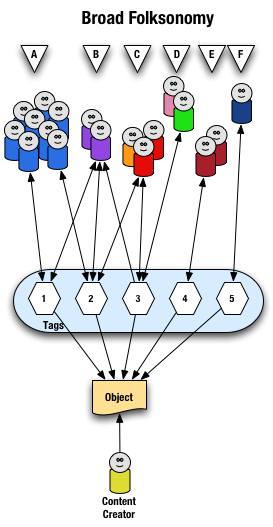
visualization of the text on broad folksonomies that follows
From a high level we see a person creates the object (content) and makes it accessible to others. Other people (groups of people with the same vocabulary represented people blobs and noted with alphabet letters) tag the object (lines with arrows pointing away from the people) with their own terms (represented by numbers). The people also find the information (arrows on lines pointing from the numeric tags back to the people blobs) based on the tags.

Digging a little deeper we see quite a few people (8 people) in group "A" and they have tagged the object with a "1" and a "2" and they use this term to find the object again. Group "B" (2 people) have applied tag "1" and "2" to the object and they use tag terms "1", "2", and "3" to find the information. Group "C" (3 people) have tagged the object with "2" and "3" so that they can find the object. Group "D" has also tagged the object with tag "3" so that they may refind the information this group may have benefitted from the tagging that group "C" provided to help them find the information in the first place. Group "E" (2 people) uses a different term, "4", to tag the object than others before it and uses only this term to find the object. Lastly, group "F" (1 person) uses tag "5" on the object so that they may find it.

Broad Folksonomy and the Power Curve

The broad folksonomy provides a means to see trends in how a broad range are tagging one object. This is an opportunity to see the power law curve at work and show the long-tail.
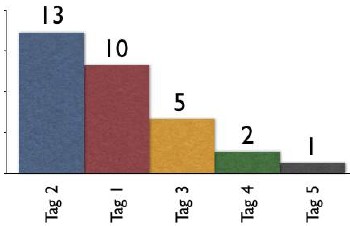
Shows tag 2 with 13 people tagging, tag 1 with 10 people, tag 3 with 5 people, tag 4 with 2 people, and tag 5 with 1 person
The tags spike with tag "2" getting the largest portion of the tags with 13 entries and tag "1" receiving 10 identical tags. From this point the trends for popular tags are easy to see with the spikes on the left that there are some trends, based on only those that have tagged this object, that could be used extract a controlled vocabulary or at least know what to call the object to have a broad spectrum of people (similar to those that tagged the object, and keep in mind those that tag may not be representative of the whole). We also see those tags out at the right end of the curve, known as the long tail. This is where there is a small minority of people who call the object by a term, but those people tagging this object would allow others with a similar vocabulary mindset to find the object, even if they do not use the terms used by the masses over at the left end of the curve. If we take this example and spread it out over 400 or 1,000 people tagging the same object we will se a similar distribution with even more pronounced spikes and drop-off and a longer tail.

This long tail and power curve are benefits of the broad folksonomy. As we will see the narrow folksonomy does not have the same properties, but it will have benefits. These benefits are non-existent for those just simply tagging items, most often done by the content creator for their own content, as is the means Technorati has done, even with their following tag links to destinations other than Technorati (as they initially had laid out). The benefits of the long tail and power curve come from the richness provided by many people openly tagging the same object.

Narrow Folksonomy

The narrow folksonomy, which a tool like Flickr represents, provides benefit in tagging objects that are not easily searchable or have no other means of using text to describe or find the object. The narrow folksonomy is done by one or a few people providing tags that the person uses to get back to that information. The tags, unlike in the broad folksonomy, are singular in nature (only one tag with the term is used as compared to 13 people in the broad folksonomy using the same tag). Often in the narrow folksonomy the person creating the object is providing one or more of the tags to get things started. The goals and uses of the narrow folksonomy are different than the broad, but still very helpful as more than one person can describe the one object. In the narrow the tags are directly associated with the object. Also with the narrow there is little way of really knowing how the tags are consumed or what portion of the people using the object would call it what, therefore it is not quite as helpful as finding emerging vocabulary or emergent descriptions. We do find that tags used to describe are also used for grouping, which is particularly visible and relevant in Flickr (this is also done in broad folksonomies, but currently not to the degree of visibility that it is done on Flickr, which may be part of the killer interactive environment Ludicorp has created for Flickr).

The narrow folksonomy is illustrated as follows.
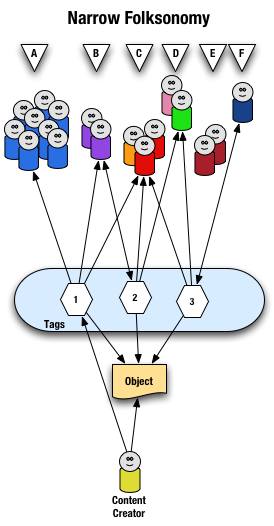
vizualization of the text on narrow folksonomies that follows
From a high level we see a person creates the object and applies a tag ("1") that represents what they call the object or believe describes the object. There are fewer tags provided than in a broad folksonomy and there is only one of each tag applied to the object. The consumers of the object also can apply tags that help them find the object or describe what they believe are the terms used to describe this object.

A closer look at the interaction between people and the object and tags in a narrow folksonomy shows us that group "A" uses tag "1" to find and come back to the object (did the creator do this on purpose? or did she just tag it with what was helpful to her). We see group "B" also using tag "1" to find the object, but they have tagged the object with tag "2" to also use as a means to find the object. Group "C" uses tag "1","2", and "3" to find the object and we also note this group did not apply any of its own tags to the object as so is only a consumer of the existing folksonomy. We see group "D" uses tags "2" and "3" to find the objects and it too does not add any tags. Group "E" is not able to find the object by using tags as the vocabulary it is using does not match any of the tags currently provided. Lastly, group "F" has their own tag for the object that they alone use to get back to the object. Group "F" did not find the object through existing tags, but may have found the object through other means, like a friend e-mailed them a link or the object was included in a group they subscribe to in their feed aggregator.

We see that the richness of the broad folksonomy is not quite there in a narrow folksonomy, but the folksonomy does add quite a bit of value. The value, as in the case of Flickr, is in text tags being applied to objects that were not findable using search or other text related tools that comprise much of how we find things on the internet today. The narrow folksonomy does provide various audiences the means to add tags in their own vocabulary that will help them and those like them to find the objects at a later time. We are much better off with folksonomies than we were with out them, even if it is a narrow folksonomy being used.

Conclusion

We benefit from folksonomies as the both the personal vocabulary and the social aspects help people to find and retain a tether to objects on the web that are an interest to them. Who is doing the tagging is important to understand and how the tags are consumed is an important factor. This also helps us see that not all tagging is a folksonomy, but is just tagging. Tagging in and of its self is a helpful step up from no tagging, but is no where near as beneficial as opening the tagging to all. Folksonomy tagging can provide connections across cultures and disciplines (an knowledge management consultant can find valuable information from an information architect because one object is tagged by both communities using their own differing terms of practice). Folksonomy tagging also makes up for missing terms in a site's own categorization system/taxonomy. This hopefully has made things a little clearer for all in our understanding the types of folksonomies and tagging and the benefits that can be derived.

This entry first appeared at Personal InfoCloud and comments are open for your use there.


This work is licensed under the Creative Commons Attribution-NonCommercial-ShareAlike License.